Top of Page Not Visible After Scrolling Down

Hi Theme Co,

I am using Integrity with a Child Theme (but have also tested this with an unmodified version of X and find this same behavior persists). I have selected to use the “Fixed Top” Header so that the user can always see the navigation.

I find that for all pages on my site that the page loads fine. However, after the user scrolls down, if she/he scrolls back up to the top that the header stays floating above the content so that the user can no longer see the top of the page. This seems to be the case for all pages across the site.

  • User Loads Page (Looks good)
  • User Scrolls Down
  • Header Floats Over Content
  • User Scrolls Back Up
  • Top Content Remains Under Header

To rule out this being an issue with my child theme, I changed the active theme to just X. The issue persists. I also checked on a variety of different page templates and layouts and this seems to be present throughout the site.

Can you help?

Thanks,
Amanda
Hey Amanda,

There might be a script conflicting with the fixed navigation. You could try testing for a plugin conflict. You can do this by deactivating all third party plugins, and seeing if the problem remains. If it’s fixed, you’ll know a plugin caused the problem, and you can narrow down which one by reactivating them one at a time.

Let us know how it goes!

Thanks.

Hi Christian,

I deactivated all plugins and am using the X Theme with no child theme and the problem persists. I am testing in Safari (both in a private browsing session and after clearing all the caches - server and browser). The issue might be browser-specific. I am running Safari Version 11.0.2 (12604.4.7.1.6). When I test in Chrome, there is no issue.

Amanda

Hello There,

Thanks for updating in!

The theme and WPEngine doesn’t really go along much. In most cases WP Engine tries to cache its resources. This can cause stale data or your site changes to be loaded. To resolve this, you’ll need to clear the site cache in WPEngine right after saving every changes you made in the site.

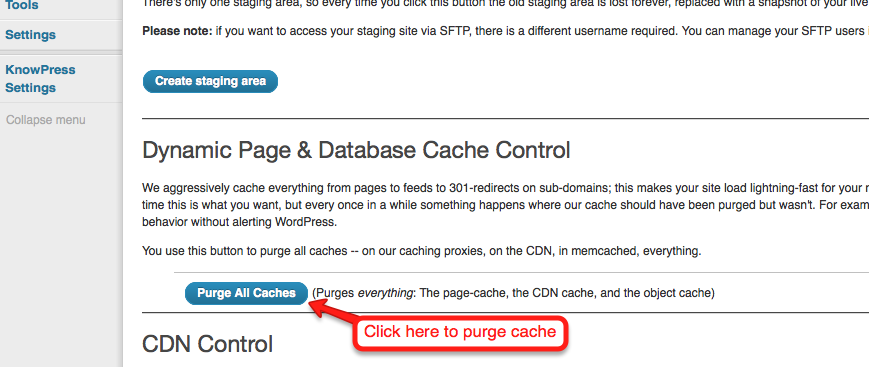
How to purge the site cache
You can use our interactive tutorial, “What should I do if I make changes and they don’t take effect?“, in the User Portal, or you can follow the instructions below.
Purging your site cache is very easy. You just need to know where the button is located:

    1. Long into /wp-admin/
    2. Click on WP Engine button located at the left top side.
https://wpengine.com/wp-content/uploads/2014/09/WPE-Plugin.png
    1. Click “Purge all caches.”
Finally, clear your browser cache and refresh your page. Once you refresh the page you should notice that the content has updated. If it is still not updating, you may want to consider contacting support by creating a support ticket.

To know more about WPEngine caching system, please check it out here: https://wpengine.com/support/cache/

And then please clear the safari browser cache again or use private browsing mode and test your site.

Please let us know if this works out for you.

Hi RueNel,

I did all of this after deactivating all plugins and changing the site over to the main (not child) X Theme.

Are you saying that there is no way that this issue is in the theme?

I have done my best to isolate this and am not sure what to do next to determine the root cause.

Thanks,
Amanda

Hi Amanda,

We can’t seem to replicate this issue in our test sites.

Can you one of our demo page and see if it is doing the same thing in your end.

http://demo.theme.co/integrity-2/

Hi Paul,

Thanks for the reply. Your demo site is not doing it.

I was able to amend the design with my client and things are looking better on my end, too.

Thanks for your help. I think we can close the ticket.

Thanks,
Amanda

Hi Amanda,

I did take one last look at your site and see 3 issues that potentially causing this header issue.

First, is the NAVBAR TOP HEIGHT (Options > Header) you added 200px in there. It should only have the 200 value, not the unit px.

Second, this custom CSS on your child theme’s style.css file.

body:not(.home) .x-navbar-wrap
{
	margin-top: 175px;
}

After you correct the header height, this CSS will push your content way down from the header. So remove this custom CSS.

Third, I think you did a customization on the child theme that affects the navbar because I don’t see the default x-navbar class on the navigation bar.

Cheers!

This topic was automatically closed 10 days after the last reply. New replies are no longer allowed.