Top Menu Links Disappear when Hovering

I accidentally deleted my menu so I recreated it but I’m having trouble with the top links disappearing when I hover the mouse over them. I’ve checked everything I can think of but nothing seems to help. The top menu background is black so maybe the top link color is changing to black. But I can’t find anywhere to change that color.

Can you tell me what I’m missing? This was working fine before.
Hello @WPDave,

Thanks for writing to us

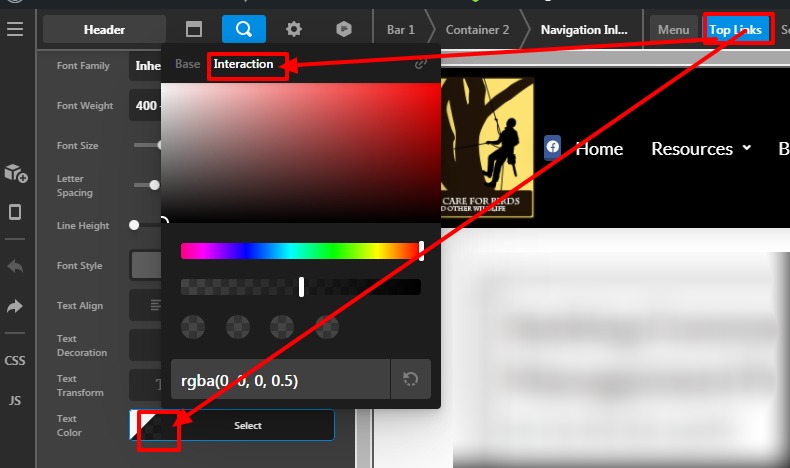
I checked your site Header menu set up. It seems that you set up the transparent colour on the link hover. To change that go to Pro–>Header -->Edit–>Select Navigation Inline —>Top Link–> Select Interaction colour to set hover colour.Please have a look at the given screenshot below.

Hope it helps
Thanks

1 Like

Oh, so that’s where the Interaction options are now! I was looking for them but it didn’t occur to me to look on the pop-up color dialog.

Thanks so much for helping me to see that!!! Problem solved.

Hi @WPDave,

Glad that we are able to help you.

Thanks

This topic was automatically closed 10 days after the last reply. New replies are no longer allowed.