Hi, can someone please help me fix the layering of the header? I have the Top Shelf logo bar set to “sticky” and it works great, aside from it scrolling underneath the menu bar.
http://www.topshelfcanada.ca/
Password = “temporary”
Thank you so much 
Hi, can someone please help me fix the layering of the header? I have the Top Shelf logo bar set to “sticky” and it works great, aside from it scrolling underneath the menu bar.
http://www.topshelfcanada.ca/
Password = “temporary”
Thank you so much
Hey Tina,
Sure, we can help you with that.
The way that layers work on a web page is using something called z-index. In short, the higher the z-index, the higher the layer appears. However, the z-index values are all relative to one another. In other words, if you have two header bars, one with a z-index value of 1 and the other with a value of 2, the latter will appear above the former. Similarly if one has a value of 9999 and the other of 99999 then the bar with the higher value will appear on top.
So getting to your issue at hand, to make the top bar appear above the bar containing the navigation, you just need to adjust the z-index so that the top bar has a higher value. You can do that easily by going to the Header Builder in Pro, then selecting the bar in question, and changing the value that appears here:
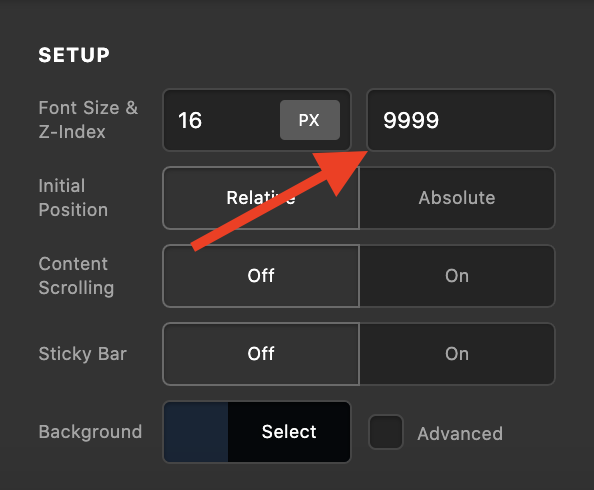
This will solve the issue
That was absolutely perfect! Thank you so much @matt, and I appreciate the explanation too!! Have an awesome day
Glad that we could be of help.
Cheers!
This topic was automatically closed 10 days after the last reply. New replies are no longer allowed.