Toolset Views Content Templates not Overriding Pro Defaults

Hey there,

I’m using Pro + Toolset Views to create, amongst other things, a custom template for my ‘Podcast’ [Sermons - created with Seriously Simple Podcasting] type, and my ‘staff’ type [created with Toolset Types].
Toolset theoretically overrides calls to the_content to replace the default Pro templates- but instead of replacing the default one it shows BOTH the toolset and the Pro content, on top of each other:

http://test.st-thomas.org.au/podcast/god-s-righteousness/
http://test.st-thomas.org.au/staff/simon-manchester/

For the Podcasts/Sermons - which is my main concern - I tried creating extra files in my child theme to ensure that it was in fact targeting the correct custom post type, and it definitely is.
I also tried going through Toolset support [https://wp-types.com/forums/topic/custom-template-wont-override-x-theme/] but they didn’t seem super helpful, which led me to think the issue is a conflict with Pro?

I tried on the X Theme Users facebook group as well and while many other people seem to have done the exact same thing no one else has had this issue :frowning:
Any suggestions would be great :smiley:

Hey there,

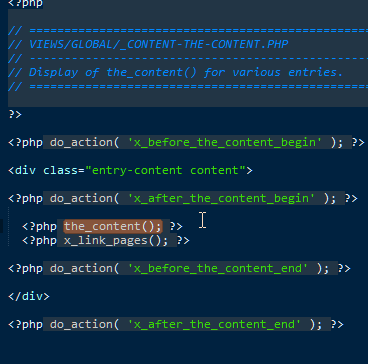
X and Pro simply uses the_content() function as you can see in the template file. When you use the content builder, it simply posts the builder’s code to the content area just like writing content using the default text editor.

It looks like your Toolset setup adds the your custom content and not override it as you’ve mentioned.

Regretfully, since this involves custom setup and a third party plugin, investigating further would be outside the scope of our support. We do have an in-house custom development team that offer paid services, who may be able to assist. They can be contacted at [email protected] if this is of interest to you. If you have any further questions about the theme, we are more than happy to provide you with assistance on these inquiries.

Thank you for your understanding.

Im having the same issue exactly - is there anything that can be done about this? Toolset says its X theme’s issue… and nobody will help me with it :frowning:

Hey @jamievilasini,

Your option for this is to hire a third-party developer as this involves customization and a third-party plugin.

Thank you for understanding.