TOC and pagination not working

hey there. i’m building out a long tutorial post and want to use the TOC with pagination however i cant get it to work. I cant seem to find any info that walks me through the implementation and the other forum posts dont seem to offer a solution.

I am using the TOC shortcode:

[toc title=“Table of Contents” type=“left”] [toc_item title=“1. Getting started” page=“1”] [toc_item title=“2. Four essential conditions” page=“2”] [toc_item title=“3. Define your actions” page=“3”] [toc_item title=“4. The building blocks” page=“4”][/toc]

with standard pagination script between each “page” section - I have tried simply inserting this in line within the text element plus within a raw element.

Any advice or info on how to implement this would be great.

(note: i have posted in the peer to peer forum too but hoping for a swifter response/solution than I might get there)

Cheers.
Hi there,

The Peer to Peer forum is a place for discussion and customers helping each other. The support forum will get answered by the official support staff.

Please kindly read the information here:

http://demo.theme.co/integrity-1/shortcodes/table-of-contents/

You need to use the for the pagination. But please consider that this is intended for the standard WordPress editor and it will not work inside the Cornerstone due to complicated nature of the builder.

We already added this to issue tracker to be able to support the functionality for the builder.

Thank you for your understanding.

Hi Christopher,

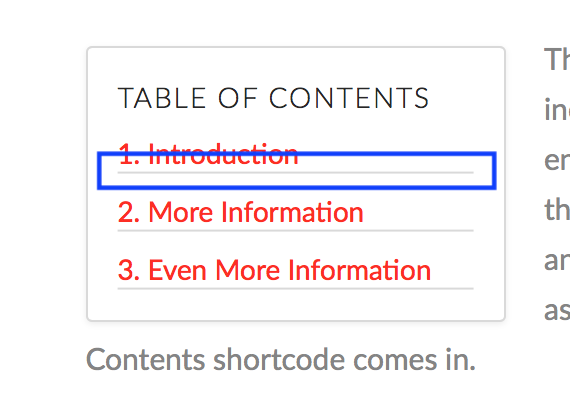
Just a quick check on if I can remove the underline of each item but still keep the outer box of the TOC?

Zoe.

Hi There,

Please try adding this custom CSS under X > Theme Options > CSS:

.x-toc-item a {
    border: none;
}

Let us know how it goes!

1 Like

It works like magic!
Thank you so much, Thai.

Best,
Zoe.

You’re welcome.

This topic was automatically closed 10 days after the last reply. New replies are no longer allowed.