Title and meta missing from blog posts

Hi. I’m using Renew here. I have Integrity on another site. Both use Pro and Headers.

Renew on schoolofbookkeeping.com will not show Title or p-meta at the top of a single blog post such as https://schoolofbookkeeping.com/cloud-storage-and-the-new-google-drive-for-teams-google-drive-file-stream/. There’s a blank there as if I used “display:none” in CSS somewhere but I can’t find that.

Integrity on 74systems.com is working fine. Once again, in Integrity, same setup, the titles and p-meta appear fine as evident here: https://74systems.com/free-blog-post-images/.

Any idea what is causing this on schoolofbookkeeping.com?
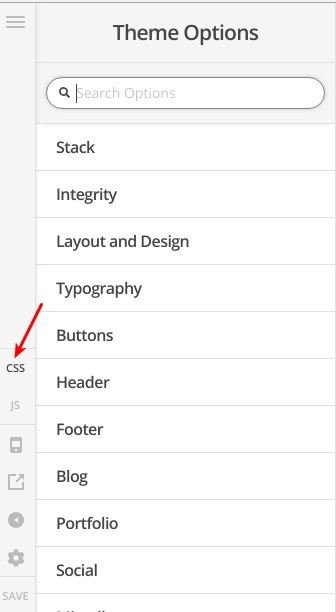
Hi @ericgreenspan

I’ve checked your website and I can see that these lines are responcible for this behaviour:

.wowbinar .entry-featured,.p-meta{display:none}

.talk .entry-featured,.entry-header,.p-meta{display:none}

They could be added to (Theme Options > CSS) as in this screenshot:

If you can’t find it there, then please provide us with WordPress Dashboard login details in a “Secure Note” so we can investigate this issue.

Thanks.

I removed them and the problem went away. Thanks. That said, how do I rewrite these so they only effect the Talk and WOWbinars custom post types? What did I do wrong here?

Hi There,

Please update your custom CSS to this:

.wowbinar .entry-featured,
.talk .entry-featured,
.talk .entry-header,
.talk .p-meta,
.wowbinar .p-meta {
     display:none
}

Hope it helps :slight_smile:

This topic was automatically closed 10 days after the last reply. New replies are no longer allowed.