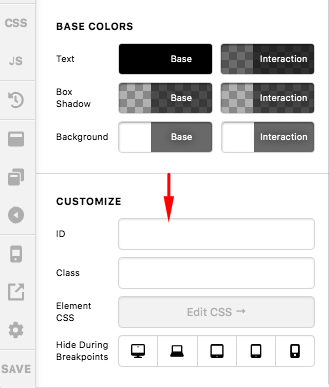
Tie Convert Plus Pop Up To Cornerstone Button in New Update

I have created a popup in Convert Plus and want to tie it to a button in Cornerstone. I followed the directions in Convert Plus but after updating Cornerstone to the latest version I cannot find the style and class options for the button in order to add the class name.

Thanks
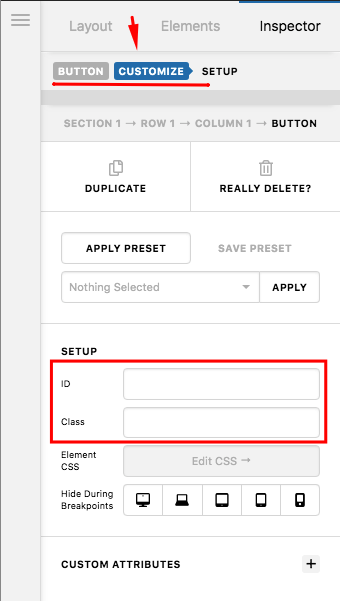
Hello @dthomas7996,

Thanks for writing in!

In the latest version of Cornerstone, you can find the Class and ID field of the element in the “Customize” tab of the button settings.

And if the Advanced Mode is disabled, you should be able to find the Customize option for the Class and ID at the bottom of the button settings.

Hope this helps.

I’m sorry, I’m not seeing either of those options…

Hey @dthomas7996,

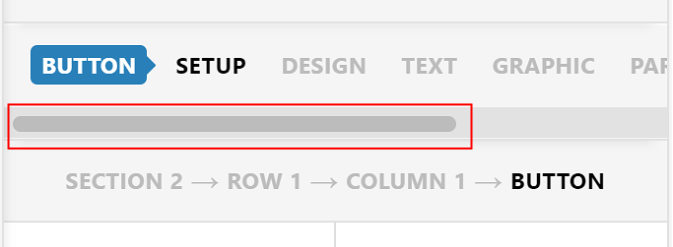
Would you mind scrolling to the right using the horizontal scrollbar of the element navigation to see if there’s a Customize tab?

If there’s a Customize tab, click it.

Thanks.

I feel a little foolish now but thank you so much; you saved my day. I just didn’t see that scroll bar.

Thanks again!

No worries, it happens to the best of us :slight_smile: Have a great day, @dthomas7996!

This topic was automatically closed 10 days after the last reply. New replies are no longer allowed.