Thumbnail Versions of Images have Grey Overlay?

Hey guys,

I’m having a problem on my website where the wordpress-generated thumbnails of my product images are grey-washed.
The original: https://www.bohoaus.com.au/wp-content/uploads/2018/03/017340-Red.jpg
The thumbnail version: https://www.bohoaus.com.au/wp-content/uploads/2018/03/017340-Red-2000x3000.jpg

My problem is that on the woocommerce shop, the thumbnail versions of the images are shown, but on the individual product pages, the original is shown.
I guess there’s code to make the shop listing images original but I’d rather not make any theme edits incase they cause problems later with theme updates.
Hi phikey,
When you upload an image to WordPress it creates several copies of it with different sizes. While resizing JPEG images with certain color profiles, this issue might happen. Please check these articles talking about this issue with some suggestions about how to fix it:

How to Fix Image Color and Saturation Loss in WordPress
How to Change WordPress JPEG Image Compression
Why images change colors when uploaded to WordPress

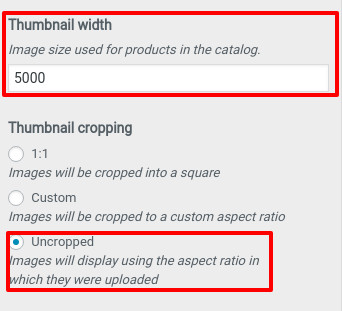
However, if you want to use the original images sizes as you suggested, you could make a note of the largest image resolution you have (let’s say 3000x4000) and set a larger width in (Appearance > Customizer > WooCommerce > Product Images) as in this screenshot:

With that large size and “Uncropped” option selected, your shop page will render the original images sizes.

Thanks.

This topic was automatically closed 10 days after the last reply. New replies are no longer allowed.