Hello @kirk74,
Sorry for the inconvenience. Please be informed that a topic will automatically closed 10 days after the last reply. No new replies are no longer allowed.
I have inspected your site and this is what I have noticed, under the Upholstery menu item, you have Vintage & Retro, Contemporary, Custom Made and Antique. All of this links will go to the correct section of the page. The only problem is that since the contents of each section is using The Essential Grid plugin, it may take a while to view the page. The grid needs to initializes upon loading the page by which the right section is already on display. By the time the grid fully displays, the section may no longer be in the right place since the height of the page moves as it is affected by the height of the grids that displays in each sections.
I also noticed that you have Leather Restoration menu item. All of the sub menu items were using a relative path with an anchor link which is not recommend as it may create issues in linking the right page or section.
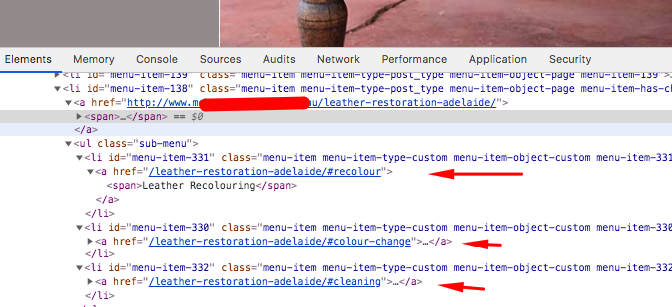
You will need to edit your menu in Appearance > Menus and make sure to use an Absolute path with an anchor like https://example.com/some-page#the-anchored-section.
One thing to note that using a relative path like /some-page#the-anchored-section will only work and scroll to the correct section when you are currently on the “Some Page” page. To make sure that your menu items will work globally, always make sure to use an absolute path such as https://example.com/some-page#the-anchored-section.
Hope this helps.
