Themeco cornerstone fails to translate (WPML) asking me to choose a page

I think images worth more words so, when I click to translate to English, it asks me to choose a page:

(image 1)

I guess it’s because I deleted the English version (to duplicate and translate it from the fresh new original version).

I tried to duplicate it from the WordPress editor, but I can’t:

(image 2)
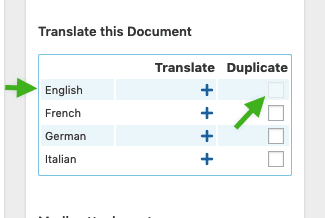
So how can I translate it to English?

Maybe creating a separated page in English, then when selecting it (image 1), WPML will know that it’s a translation?

Thanks

Carlos

Hello Carlos,

This is how it usually works from Content page list: https://screencast-o-matic.com/watch/cqji6IOsmj
When translation for that page was already created, you can see edit, or when not yet available you can see TRANSLATE button instead.

If you will edit directly the page on Cornerstone and then click the other language button, the same process apply where it will ask you to translate from blank or copy from existing.

If this is not how it works for you, please share credentials inside a secure note so we can investigate. Thank you.

There is not a translate button. There is an edit button. However, when I click to the English flag, I can’t find that page. I’ve recorder a video: https://d.pr/v/dwtXIr

The page with issues to translate it to English with Pro is: https://www.edinventa.com/download/

Hello @educainventions,

Since there is no Translate button in the Content section, please edit your Spanish version of the page with the Pro Editor and then click the English flag at the bottom so that it will ask you to create a new English translation of the page.

We would love to know if this has worked for you. Thank you.

That does NOT work as I explained on the video. Let me share it again with you: https://d.pr/v/dwtXIr

In short: when I click to the English flag, it does NOT ask me to create a new English translation.

Notice it DO work with the page you did a screenshot, but it does NOT work with the page I mentioned: the page with issues to translate it to English with Pro is: https://www.edinventa.com/download/

Carlos

Hi @educainventions,

There are errors:

It can be Mod Security settings or permalink issue. Please check this thread.

Permalink and the rest of the items seem correct. I changed to manual translation in WPML, but it didn’t fix anything.

I don’t understand about Mod Security, but I copy and pasted to ask our hosting provider.

What about the greyed out of WPML to duplicate the page to translate it? The translation seems unfinished, but I don’t find how to go back (if that’s the issue). Maybe that’s the key to fix the issue. Remember this problem appear when I delete the old translation to English…

Do you know how to be able to duplicate it?

Thanks

Carlos

Hello Carlos,

To make sure that there is a translation page already, please go to Pages and you’ll see if there is an available translation page if you have an edit icon. If it is still a “+” sign then you do not have have any.

Meanwhile, please make sure that everything is up to date as well. And then, please ask your hosting provider to whitelist the url in the secure note because you ModSecurity might be enabled.

Please let us know how it goes.

Well, actually I’m seeing something weird: if I hover on that “+”, it says Edit translation! (whereas if I hover any other “+”, it says Add translation):

If I click on that “+” which says Edit Translation, the following is opened:

I’m also in contact with our hosting provider. Actually, I gave them the link of this thread…

Thanks for your help

Carlos

Hey Carlos,

Yes, I can confirm that it is a bit weird. The translation pages must have been corrupted or something. I would recommend that you edit the page in Pro editor, saved it as a page template and then you delete the page. You must empty your trash bin first before you re create the page. This is the quickest way to get back on translating your page. It is difficult to find the resolution for corrupted page info which could take a while or not even result to nothing. I think the best option is to re create the page instead.

Hope this makes sense.

This worked! Thanks one more time :slight_smile:

Carlos

You’re always welcome Carlos!

Cheers.

This topic was automatically closed 10 days after the last reply. New replies are no longer allowed.