Theme update messed up superfly menu

hi!

For some reason superflu menu css code doesn’t work anymore on my site after the latest theme update. Could you please help with this issue?

Issue one - navbar is not showing up correctly.

/* mobile navbar */

@media only screen and (max-width: 979px) {

#sfm-mob-navbar {

height: 60px;

	position: fixed;

  text-align: left;

padding-left: 25px;

}

}

/* desktop navbar */

@media screen and (min-width: 980px) {

#sfm-mob-navbar {

    height: 75px;

    width: 100%;

    left: 0;

    position: fixed;

    padding-left: 25px;

    text-align: left;

}

}

Issue two - to have the last menu item on smaller font…

#sfm-sidebar.sfm-sidebar-exposed .sfm-menu-level-0>li:nth-child(6) {

font-size: 9px;
}

Hello Minna,

Thanks for writing to us.

It seems that the navbar is working fine at my end. Please have a look at the screenshot in the secure note. It might be an issue with the browser cache. In case if you are pointing something else please let us know.

For the font size, I would suggest you update the code by the given code.

#sfm-sidebar.sfm-sidebar-exposed .sfm-menu-level-0>li:nth-child(6) {
font-size: 9px;
}

Replace with this code.

#sfm-sidebar.sfm-sidebar-exposed .sfm-menu-level-0>li:nth-child(6) a {
    font-size: 9px !important;
}

The purpose of providing custom CSS is to show you how to add CSS code to your site. Writing custom CSS is outside the scope of our theme support. If you need more customization, you need to learn CSS and learn how to use the browser’s element inspector.

Hope it helps.
Thanks

thank you, the code for the font size worked. I cleared my cache and I still see the navbar incorrectly. The logo should be on the left in mobile and desktop view, not centered. It seems to be showing the mobile navbar on desktop aswell, the logo is a bit smaller and height of the navbar aswell. I’ll attach a printscreen from my English site as a comparison, (or you can visit that site to see for yourself).

This is how it should be on the Finnish site

This is how it is now

Hello Minna,

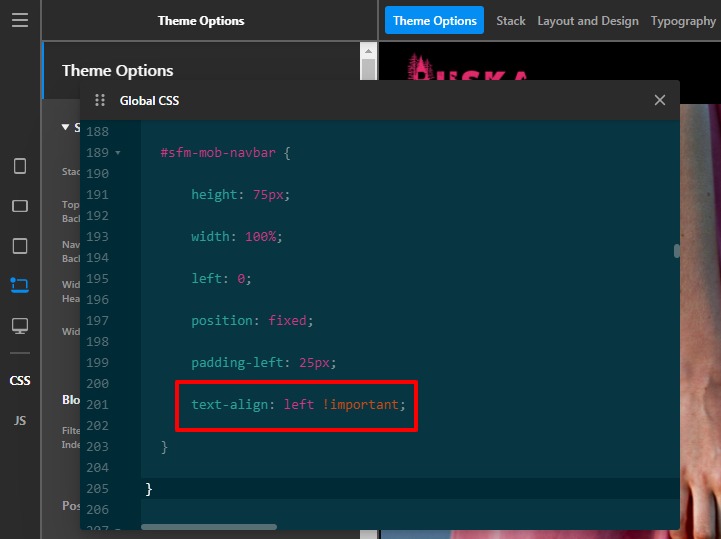
I have updated the code in the Theme Option.
Updated Code text-align: left !important;
Please have a look at the given screenshot below.

Output

The purpose of providing custom CSS is to show you how to add CSS code to your site. Writing custom CSS is outside the scope of our theme support. If you need more customization, you need to learn CSS and learn how to use the browser’s element inspector.

Hope it helps.
Thanks

This topic was automatically closed 10 days after the last reply. New replies are no longer allowed.