Updated X theme fro 4 to 6. Site is using X-Child Theme.
Went to the Theme Options page (https://www.finestcityimprov.com/x/#/options) in my dashboard and i get HTTP ERROR 500.
thanks
Updated X theme fro 4 to 6. Site is using X-Child Theme.
Went to the Theme Options page (https://www.finestcityimprov.com/x/#/options) in my dashboard and i get HTTP ERROR 500.
thanks
Hello @Finestcityimprov,
Thanks for writing in!
Usually an error 500 in the theme options page would mean that you have exhausted your PHP memory limit. We recommend that you increase your memory allocated to PHP. To increase it, please edit your wp-config.php file and insert these lines:
define( 'WP_MEMORY_LIMIT', '256M' );
define( 'WP_MAX_MEMORY_LIMIT', '512M' );
You can add it before the line
/*That's all, stop editing! Happy Blogging. */
And if this does not help, please provide us access to your site so that we can investigate the issue further.
Hope this helps. Please let us know how it goes.
thank you. Unfortunately, It did not solve the error.
Hey @Finestcityimprov,
I installed a Server Status plugin in your site and saw that your defined memory is only is only 64mb. This means that even though you implemented @RueNel’s suggestion, your host might have a hard limit so you cannot increase the memory. You will need to contact them to increase your memory.
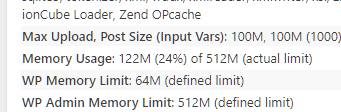
If they could not increase the memory, regretfully, you will need to move to a better host. If memory’s already increased and it still does not solve the issue, please enable debugging by following the WordPress Debug documentation at https://codex.wordpress.org/WP_DEBUG. Please note of the 2 ways you can enable debugging which is showing the error in the front-end of your site (easiest) and enable the WordPress Debug Log (recommended for live sites).
Once you see the specific error, please post a screenshot of it here and that will give us more information that will lead as to the cause of the issue. Alternatively, you can give us FTP access and we’ll check your error log and see if the theme is causing the issue.
Please also try testing for a plugin conflict. You can do this by deactivating all third party plugins, and seeing if the problem remains. If it’s fixed, you’ll know a plugin caused the problem, and you can narrow down which one by reactivating them one at a time.
Thanks.
I deactivated all plugins except themeco plugins. The options and cornerstone pages then loaded fine. I started adding each plugin back one by one and got this error on REVOLUTION SLIDER when i tried to activate it:
Fatal error: Cannot redeclare set_revslider_as_theme() (previously declared in /home/finestcityimprov/public_html/wp-content/plugins/revslider/revslider.php:45) in /home/finestcityimprov/public_html/wp-content/plugins/revslider-bak-12-9-2015/revslider.php on line 46
You’re activating Revolution Slider plugin, please activate your main slider plugin and not the backup one. And that error isn’t related to the main issue since it’s only triggered as you activate two and the same plugin.
Have you tried contacting your hosting provider to see if they can allow memory limit increase?
Thanks!
i didn’t need to it’s working now. thanks
I see, glad it’s working now. Cheers!
This topic was automatically closed 10 days after the last reply. New replies are no longer allowed.