Theme CSS Rules Throwing Off Format

Hi,

We’re using Recart to add push notifications to our website.

When the notifications are active it looks like the following screenshot.
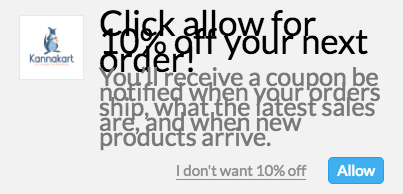
As you can see the text size and spacing is off. I believe it is caused by conflicting CSS rules in our theme. However, I am unsure of how to fix it. Some help on this would be much appreciated.

Thanks in advance!

Hi There,

Please add the following CSS under Customizer > Custom > Global CSS:

.ghostmonitor-container .ghostmonitor-notification-popup__title,
.ghostmonitor-container .ghostmonitor-notification-popup__subtitle {
    line-height: 1;
}

Hey Thai,

I added the CSS and the popup still appears with overlapping text.

Hi there,

Would you mind providing the link to the page that was the issue so that we can check it.

Thank you.

Hi Jade,

I can’t provide a specific page but if you go to our home page it should pop up for you since you’ve never been on our site before.

https://kannakart.com/

After you pass the age verification the popup should come up after about 10-15 seconds.

Hi there,

It never appears after age verification. Is there a manual trigger to display it?

Thanks!

Hi Rad,

There is no manual trigger. However, if you try it on an incognito window, it should still show up and you won’t have to clear cache.

Hi there,

I’m able to see it now in a different browser. The issue is caused by your custom CSS, like this

h1, .h1 {
    font-size: 35px !important;
}

h2, .h2 {
    font-size: 25px !important;
}

The font size is changed, but not the line height. Please add this CSS as well,

.ghostmonitor-container .ghostmonitor-notification-popup__title {
    line-height: 35px !important;
}
.ghostmonitor-container .ghostmonitor-notification-popup__subtitle {
    line-height: 25px !important;
}

Thanks!

Worked perfectly, thanks!

You’re welcome.