The Image is disappearing underneath the menu banner

Hi,

I am having issues with the images/ content in the first content section on my homepage.

The image box is truncated and some of the image is lost underneath the menu bar.

The site is http://thisscientistsays.com

My plug ins and themes are up to date.

Thank you.
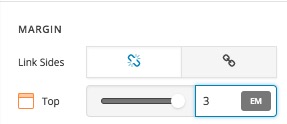
Hi there,

You have set the menu of your website to be sticky. When the menu is sticky the content goes behind the menu. You will need to add a margin for the top section. Just go to the top section add a top margin to it:

Thank you.

Hi,

Thank you Christopher. When I make the margin bigger it makes the image huge (also my margin box doesnt look the same as yours so maybe i am in the wrong place?) - is there anyway I can have the whole image in the box without making the box huge? If this is a simple resize of the photo then please can you tell me what dimensions i need.

Thank you again,

Gemma

Hi Gemma,

By default the background image size is set to cover which means to Scale the background image to be as large as possible so that the background area is completely covered by the background image. Some parts of the background image may not be in view within the background positioning area

You can change it to contain and change the position to adjust the image visibility.

Contain means - Scale the image to the largest size such that both its width and its height can fit inside the content area

For more information kindly refer to this link.

https://www.w3schools.com/cssref/css3_pr_background-size.asp
https://www.w3schools.com/cssref/playit.asp?filename=playcss_background-size&preval=50%
https://www.w3schools.com/cssref/pr_background-position.asp

Hope that helps

This topic was automatically closed 10 days after the last reply. New replies are no longer allowed.