Hey,
I’ve managed to override WooCommerce categories and tag archives to use The Grid for this pages with the following code:
<?php

// =============================================================================
// VIEWS/ETHOS/WOOCOMMERCE.PHP
// -----------------------------------------------------------------------------
// WooCommerce page output for Ethos.
// =============================================================================

get_header();

?>


 <div class="x-container max width main">
<div class="offset cf">
  <div class="<?php x_main_content_class(); ?>" role="main">

    <?php if ( x_is_product() ) : ?>
      <?php x_ethos_entry_top_navigation(); ?>
    	<?php woocommerce_content(); ?>
    	  <?php elseif ( is_shop() ) : ?>
      <?php The_Grid('Produkte: ThemenBoxen', true); ?>
    <?php elseif ( is_product_category() ) : ?>
      <?php The_Grid('Produkte: ThemenBoxen', true); ?>
    <?php elseif ( is_product_tag() ) : ?>
      <?php The_Grid('Produkte: ThemenBoxen', true); ?>
    <?php else : ?>
    <?php woocommerce_content(); ?>
    <?php endif; ?>

  </div>

  <?php get_sidebar(); ?>

</div>
  </div>

<?php get_footer(); ?>
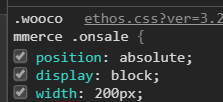
Working perfect, see here BUT why is the “For sale” (“Angebot” in German) field so big? You can see here what it should to look like (both pages using same The Grid).
I know it’s custom development but I’ve come such a long good way for myself and stuck now on this issue. Any hint for me? There must be something on the archives that is conflicting with the css of the Grid?