Hello, I am creating a front page and I’d like the text to occupy only the left 2/3 of the column. How do I do that, while keeping the text centered for the mobile website?
Hi there,
Thanks for writing in! Try giving your text element a class e.g home-text and then add the following code in the Theme Options > CSS:
.home-text {
    width: 75%;
    margin: 0 auto !important;
}
Hope this helps!
Hi, thanks for the fast reply!
That works, however I was mistaken, I actually want the text to be on the right side of the column, what do I need to change?
Also, I have a background image, and on the mobile website the text gets cut, so how do I display this text the right way? I’d like the text to be under the image for the mobile website, and over the image for the regular website
Hi there,
You can make use of the text align option for the column.
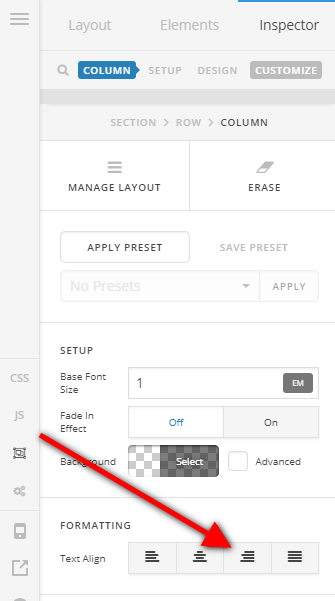
As for displaying the text below the image on mobile, you can make use of the Hide During Breakpoints for sections. So you could create two sections where the first one will be displayed on desktop with the normal display then the second would be a section that contains an image element then a text element below it.
To set the display and choose which display with the sections will be visible, click on the customize option of the section then set the display during breakpoints option accordingly.

Hope this helps.
@Jade, thanks
the Hide During Breakpoints is what I needed, thank you.
But for the text I want it to be using only the 2/3’s right side of the page with a left align.
Here is what I need:
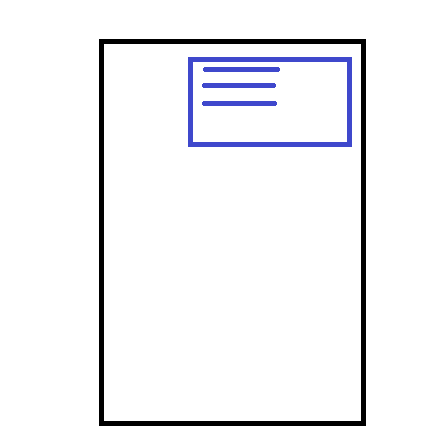
also, it would be nice to leave a minimal margin on the right so the text doesn’t go until the end of the screen
Hi again,
First give your button a class home-button for the proper alignment and then you can use the following code:
.x-text.home-text {
  width: 75%;
  text-align: left;
  float: right;
  margin-right: 5%;
}
.home-button {
    clear: both;
    float: right;
    margin-right: 5%;
}
Hope this helps!
1 Like
works perfectly, thanks you guys!
Glad it worked.
Cheers!
This topic was automatically closed 10 days after the last reply. New replies are no longer allowed.