On this page, for some reason all the text isn’t select-able. Normally, you would be able to highlight it to copy and paste it.
Any idea how to fix this?
On this page, for some reason all the text isn’t select-able. Normally, you would be able to highlight it to copy and paste it.
Any idea how to fix this?
Hi there,
Thanks for writing around! It’s a section’s z-index issue, please edit your page in Pro builder and inspect your sections and change the z-index from 1 to 0 (see screenshot)
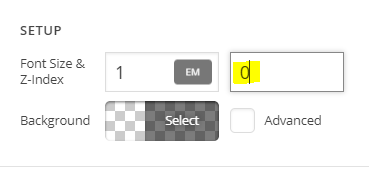
Cheers!
Hi, I tried changing the Z index on the section to 0. And it didn’t work.
I also tried changing the Z index on the row to 0. And that didn’t work either.
Hi There,
Thanks for writing in!
Please add this CSS to your theme option -> Global CSS and let us know how this goes.
.e104-22.x-section {
clear: both;
}
Thanks
Hi, it fixes it for that particular post, but it doesn’t fix it for other posts.
Hey @looktothesouth,
Please have the css code updated and use this instead:
.x-section {
    clear: both;
}
Please let us know how it goes.
That did it. Thanks for the help!
You’re more than welcome, glad we could help.
Cheers!
This topic was automatically closed 10 days after the last reply. New replies are no longer allowed.