Text block align

hi there,
i would like to get the text block in the middle of the (hero)-image.
what is the best way to do that?
(so, not centering the text itself, but centering the block so it is in the middle of the image)
txs!

example on this page:

and the same question for buttons:
they also stay on the left, even though i have chosen center under the options at the tab “inspector”
exampel:
Hello @wonderacademie
Thanks for writing to us.
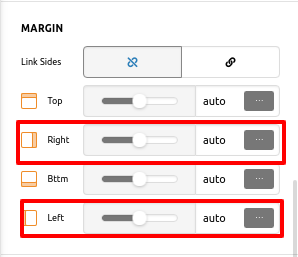
I take a close look on your site and I found that there is 40% width in the text block, to align in middle the text area you need to set margin values auto. Please have a look the screenshot given below.

margin-setting
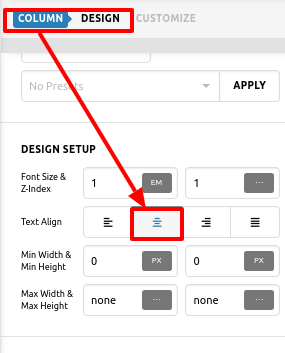
colom-text-setting
When you set text-align centre in button module, it makes centre the button text in the button, It doesn’t centre the whole button. To make the button centre aligned you have to choose the text-align centre for that column.

Hope it helps you
Thanks

1 Like

Thank you very much, that’s it!
(for both questions)

Hello @wonderacademie
Glad to know that things are well for you
Have a great day!
Thanks

1 Like

this was a great help!
realizing there was a “column option” for which i had to go to the layout section solved more questions i had :).

This topic was automatically closed 10 days after the last reply. New replies are no longer allowed.