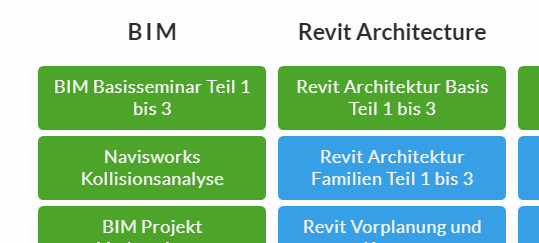
How can I arrange the text lines on the buttons more evenly e.g.
BIM Basisseminar
Teil 1 bis 3
site:
https://bit.ly/2Ughb4w
How can I arrange the text lines on the buttons more evenly e.g.
BIM Basisseminar
Teil 1 bis 3
site:
https://bit.ly/2Ughb4w
Hello Thomas,
Thanks for reaching out. 
You can try adding following CSS under Pro > Theme Options > CSS:
.x-anchor-text-primary {
    display: inline-table;
}
1- I have found the proper CSS code selector using the Chrome browser Developer Toolbar: https://www.youtube.com/watch?v=wcFnnxfA70g
2- For the CSS code itself, I suggest that you get started with this tutorial: https://www.youtube.com/watch?v=yfoY53QXEnI
Thanks.
thank you for your help, but it looks still the same 
Hi Thomas,
You can insert a <br> tag to a text to force a line break to it.
e.g.
BIM Basisseminar<br>
Teil 1 bis 3
Or you can also utilize the Button’s Secondary Text option.

Hope it helps,
Cheers!
This topic was automatically closed 10 days after the last reply. New replies are no longer allowed.