Testimonials change stars

Hi!

I have the website: https://calamiaresort.com/test2/ and have a question regarding the testimonial.

I would like to make all the stars orange at the bottom (currently it is just 3,5 full stars, but I want to make all of the 5 stars full). Where is the setting for that?

I would also like to that the name under the testimonial is in white and make the avatar picture white.
I looked everywhere in the settings for changing this, but couldn’t find it?

Thank you!

Kind regards
Maria
Hey Maria,

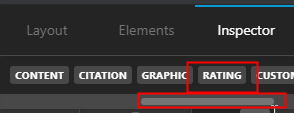
To change the Rating, use the horizontal scrollbar of the Testimonial Navigation to get to the Rating, menu.

The Rating field is under that menu.

-----------------------------------------------------------------------------------

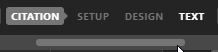
For the name, go to Citation > Text

Scroll down till you see the Text Color option.

-----------------------------------------------------------------------------------

If you don’t see the options I’ve shown, please try enabling the Advanced Mode in Cornerstone’s Preferences.

I’d recommend that you check out the full documentation of the Testimonial element here: https://theme.co/apex/forum/t/elements-testimonial/61650

Hope that helps.

This topic was automatically closed 10 days after the last reply. New replies are no longer allowed.