Template Settings for Posts

Hi Themeco Team,

Does the X Theme include a way to change the template for Posts to Blank - No Container | Header, Footer, and the other layouts, like we can with Pages?

If not, can you provide suggestion on how this can be achieved with the Integrity stack? I’m trying to remove the containers entirely from Posts so I can have a full width hero image.

Thank you!

Hi There,

Thank you for writing in, please add this to Theme Options > CSS

.single-post .x-container.max.width.offset {
	width: 100%;
	max-width: none;
}
.single-post .entry-wrap {
	box-shadow: none;
	background-color: transparent;
}
.single-post .x-comments-area {
	padding-left: 60px;
    padding-right: 60px;
}

Have a nice weekend,
Cheers!

Thank you for the quick response!

Unfortunately the CSS you provided does not appear to work as intended – please see screenshot.

However I was able to achieve something close with the following CSS:

.entry-title {
display: none;
}
.x-container.offset {
margin: 0;
}
.single-post .x-container.max.width.offset {
width: 100%;
max-width: none;
}
.single-post .entry-wrap {
box-shadow: none;
background-color: transparent;
padding: 0;
}

The only issue now is that there is still space between the first container and the navbar, which I have been unable to isolate and remove – please see screenshot.
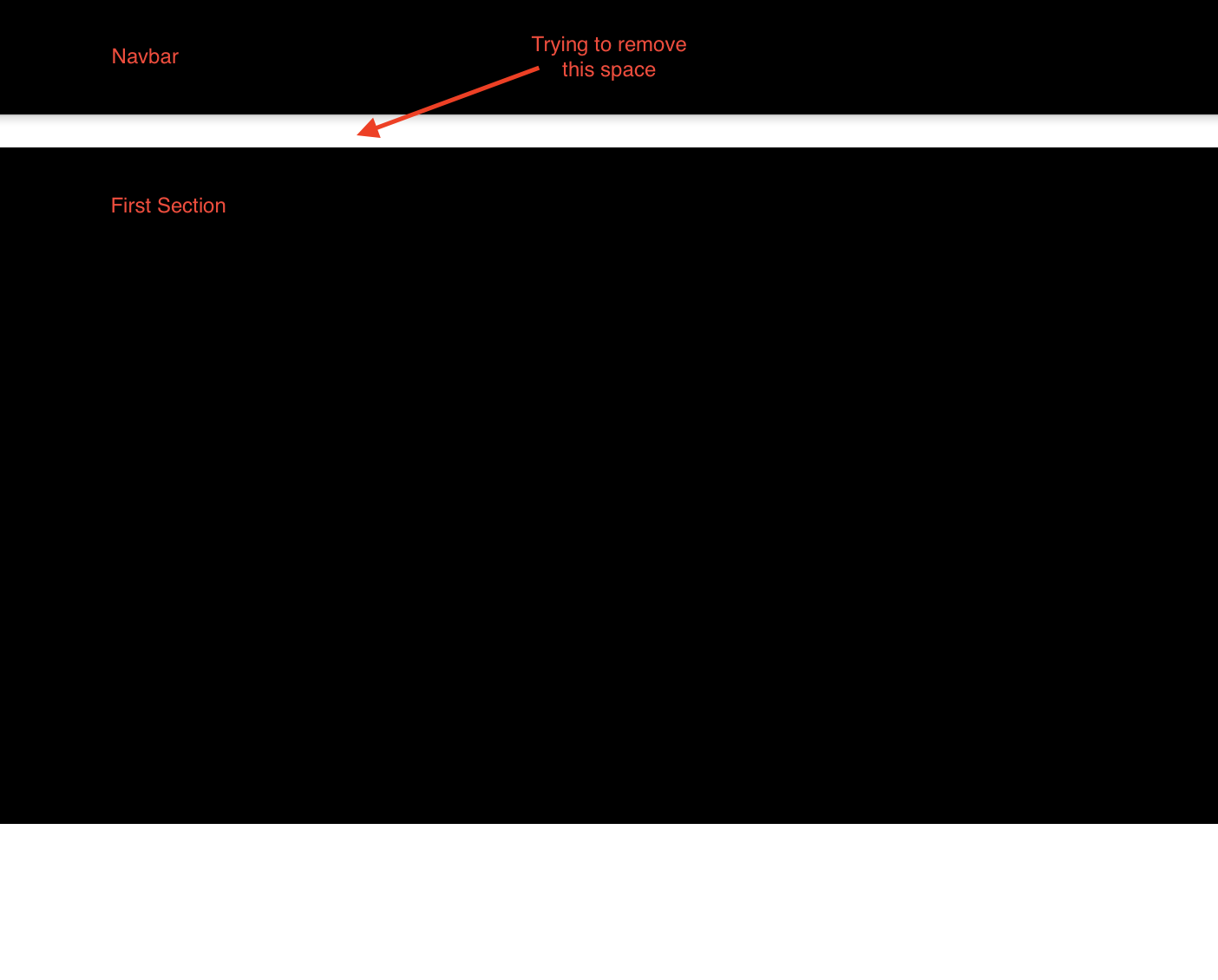
I’m basically trying to achieve the same look as the “Blank - No Container | Header, Footer” template for Pages.

Can you suggest another way to achieve this or additional CSS to remove the last bit of space?

Hi There,

The posts don’t have the post template. You can achieve that by using the custom CSS.

Please replace your custom CSS with this:

.single-post .x-container.max.width.offset {
    width: 100%;
    max-width: 100%;
    margin: 0;
}
.single-post #wpcomm {
    margin-bottom: 0;
}
.single-post .entry-title {
    display: none;
}

If it doesn’t help, please provide us with your website URL so we can take a closer look.

Thank you.

Thank you again for the quick response!

The CSS you provided did not work. I have added my URL in a secure note.

Appreciate your help!

Hello @bartenderonduty,

To remove the spaces in the given url, please make use of this custom css instead:

.single-post .x-navbar{
    border: none;
}

.single-post .entry-content.content {
    margin-top: 0;
}

.single-post .entry-wrap {
    margin: 0 auto;
    padding: 0;
}

By the way, you might be interested in checking out this thread: https://theme.co/apex/forum/t/creating-post-templates-without-a-landmark/310698, https://theme.co/apex/forum/t/post-template-for-custom-post-type/74957 as a reference if you want to customize your very own clean slate post template.

Hope this helps.

Thank you, it worked! I appreciate your help.

You’re welcome!
We’re glad we were able to help you out.

This topic was automatically closed 10 days after the last reply. New replies are no longer allowed.
