Hello,
Could it be possible to target with css only few lines in a table (i know how to change all of them but not few), for exemple here :
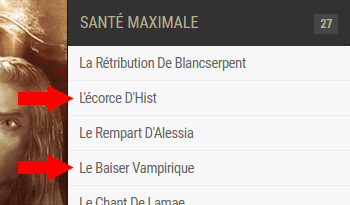
Having the 2nd and 4th from first group (santé maximale) with background in red and font in white and the same from second group (vigueur maximale) ?
Just to undestand how it works, i’ll have much more to target with differents colors in each groups.
Hi There,
Please take a look at the nth-child CSS:
The custom CSS for the 2nd and 4th line will be:
.mapplic-list-category ol li:nth-child(2) > a,
.mapplic-list-category ol li:nth-child(4) > a {
    background-color: red !important;
    color: #fff !important;
}
.mapplic-list-category ol li:nth-child(2) > a h4,
.mapplic-list-category ol li:nth-child(4) > a h4 {
    color: #fff !important;
}
Regards!
Thx you, i see how it works.
As you can see it affect the 2nd and 4th line of every group, is it possible to have control on witch group is affected by colors ?
Hello There,
I am confused with the latest inquiry. You can control each of the line by using the custom css along with the number in it. I am not sure which is the group you are referring too. Could you please give some further clarifications as to what you have in mind?
Thank you in advance.
Hello RueNel,
Yes sure, The first group (SANTÉ MAXIMALE, it’s like accodeon, you can close it when clic on it) is already open with red lines modified by css, if you scroll down you’ll see the next group (VIGUEUR MAXIMALE), when you open it, there is the same lines colored than first group.
Can it be possible to target differents lines in each group instead of same lines in all groups ?
Hello There,
Thank you for the clarifications. Well in that case, you can update the code and use this:
[data-category="santemax"] ol li:nth-child(2) > a,
[data-category="santemax"] ol li:nth-child(4) > a {
    background-color: red !important;
    color: #fff !important;
}
[data-category="santemax"] ol li:nth-child(2) > a h4,
[data-category="santemax"] ol li:nth-child(4) > a h4 {
    color: #fff !important;
}
And this will be for the second group VIGUEUR MAXIMALE:
[data-category="vigueurmax"] ol li:nth-child(2) > a,
[data-category="vigueurmax"] ol li:nth-child(4) > a {
    background-color: green !important;
    color: #fff !important;
}
[data-category="vigueurmax"] ol li:nth-child(2) > a h4,
[data-category="vigueurmax"] ol li:nth-child(4) > a h4 {
    color: #fff !important;
}
I chose the color green to distinguish the change in each group.
Hope this helps.
That’s perfect, thx you very much !
Awesome support, you guys doing great !
You’re welcome. Glad we could help.
This topic was automatically closed 10 days after the last reply. New replies are no longer allowed.