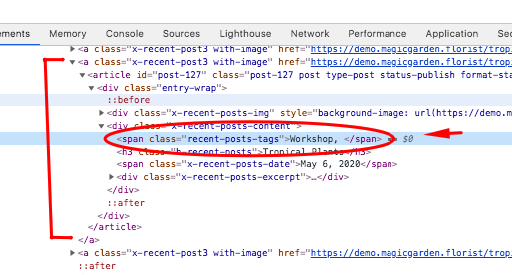
Good morning, I use the following shortcode to display a set of blogs filtered by category:
[x_recent_posts show_excerpt="true" count="3"]
I then added the following to the functions.php in the child theme to display the post tag above the post title:
// Additional Functions
// =============================================================================

function x_shortcode_recent_posts_v2code( $atts ) {
  extract( shortcode_atts( array(
    'id'           => '',
    'class'        => '',
    'style'        => '',
    'type'         => 'post',
    'count'        => '',
    'category'     => '',
    'offset'       => '',
    'orientation'  => '',
    'show_excerpt' => 'true',
    'no_sticky'    => '',
    'no_image'     => '',
    'fade'         => ''
  ), $atts, 'x_recent_posts' ) );

  $allowed_post_types = apply_filters( 'cs_recent_posts_post_types', array( 'post' => 'post' ) );
  $type = ( isset( $allowed_post_types[$type] ) ) ? $allowed_post_types[$type] : 'post';

  $id            = ( $id           != ''     ) ? 'id="' . esc_attr( $id ) . '"' : '';
  $class         = ( $class        != ''     ) ? 'x-recent-posts cf ' . esc_attr( $class ) : 'x-recent-posts cf';
  $style         = ( $style        != ''     ) ? 'style="' . $style . '"' : '';
  $count         = ( $count        != ''     ) ? $count : 3;
  $category      = ( $category     != ''     ) ? $category : '';
  $category_type = ( $type         == 'post' ) ? 'category_name' : 'portfolio-category';
  $offset        = ( $offset       != ''     ) ? $offset : 0;
  $orientation   = ( $orientation  != ''     ) ? ' ' . $orientation : ' horizontal';
   $show_excerpt  = ( $show_excerpt == 'true' );
  $no_sticky     = ( $no_sticky    == 'true' );
  $no_image      = ( $no_image     == 'true' ) ? $no_image : '';
  $fade          = ( $fade         == 'true' ) ? $fade : 'false';

  $js_params = array(
    'fade' => ( $fade == 'true' )
  );

  $data = cs_generate_data_attributes( 'recent_posts', $js_params );

  $output = "<div {$id} class=\"{$class}{$orientation}\" {$style} {$data} data-fade=\"{$fade}\" >";

    $q = new WP_Query( array(
      'orderby'             => 'date',
      'post_type'           => "{$type}",
      'posts_per_page'      => "{$count}",
      'offset'              => "{$offset}",
      "{$category_type}"    => "{$category}",
      'ignore_sticky_posts' => $no_sticky
    ) );

    if ( $q->have_posts() ) : while ( $q->have_posts() ) : $q->the_post();

	   $post_tags = get_the_tags();
        $tags = "";
        if ( $post_tags ) {
            foreach( $post_tags as $tag ) {
                $tags .=  $tag->name . ', ';
            }
        }


      if ( $no_image == 'true' ) {
        $image_output       = '';
        $image_output_class = 'no-image';
      } else {
        $image              = wp_get_attachment_image_src( get_post_thumbnail_id(), 'entry-cropped' );
        $bg_image           = ( $image[0] != '' ) ? ' style="background-image: url(' . $image[0] . ');"' : '';
        $image_output       = '<div class="x-recent-posts-img"' . $bg_image . '></div>';
        $image_output_class = 'with-image';
      }

       $excerpt = ( $show_excerpt ) ? '<div class="x-recent-posts-excerpt"><p style="color:initial;">' . preg_replace('/<a.*?more-link.*?<\/a>/', '', cs_get_raw_excerpt() ) . ' <div class="HomeReadMore"><span class="more-link">' . __( 'Read More', '__x__' ) . '</span></div></p></div>' : '';


      $output .= '<a class="x-recent-post' . $count . ' ' . $image_output_class . '" href="' . get_permalink( get_the_ID() ) . '" title="' . esc_attr( sprintf( csi18n('shortcodes.recent-posts-permalink'), the_title_attribute( 'echo=0' ) ) ) . '">'
                 . '<article id="post-' . get_the_ID() . '" class="' . implode( ' ', get_post_class() ) . '">'
                   . '<div class="entry-wrap">'
                     . $image_output
                     . '<div class="x-recent-posts-content">'
		   . '<span class="recent-posts-tags">' .$tags . '</span>'
                       . '<h3 class="h-recent-posts">' . get_the_title() . '</h3>'
                       . '<span class="x-recent-posts-date">' . get_the_date() . '</span>'
                        . $excerpt
                     . '</div>'
                   . '</div>'
                 . '</article>'
               . '</a>';

    endwhile; endif; wp_reset_postdata();

  $output .= '</div>';

  return $output;
}

add_action('wp_head', 'change_recent_posts_to_v2');
function change_recent_posts_to_v2() {
  remove_shortcode( 'x_recent_posts' );
  add_shortcode( 'x_recent_posts', 'x_shortcode_recent_posts_v2code' );
}
However if I click on the tag name it does not take me to those tags, instead it goes to the blog post. What do I need to update to make this happen?
Thank you!
Jason