Tab and Graphic Headline Customization

Hi,

I am working on the mobile view for some pages and need a little help accomplishing a few things. I need to:

  1. Remove the border below the active tab, so that the white of the tab connects with the white of the content area

  2. Move the graphic to the right of the text in a headline. Also, Iw ant to move the headline and graphic to the lower right of the area on mobile only.

Please see attached image below:
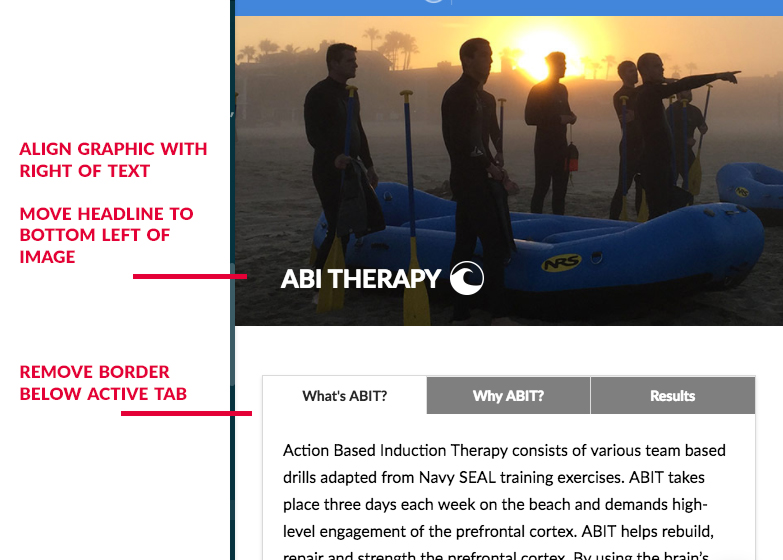
Thanks so much!

Hello There,

Thanks for posting in!

1.) This is because of your margin and paddings added in the section and rows.
http://prntscr.com/i8gypz, http://prntscr.com/i8gyvq

If you want to position the headline, please update your custom css code and use this:

@media (max-width: 768px){
  .modhero {
    background-size: 180%!important;
    padding: 0 !important;
    padding-top: 20% !important;
    padding-bottom: 20% !important;
    background-position: -140px!important;
  }
}

The 14% padding of the text element should be remove so that the heading text will display at the left side.

2.) And to remove the border of the active tab, please make use of this code:

.x-tab-content {
  border: none;
  box-shadow: none;
}

Hope this helps. Please let us know how it goes.

Thanks for your reply! That fixed the header. However, I am still having issues with the tabs. I don’t want to to remove the border around the content area. I just want to remove the bottom border from the active tab, so the white of the active tab flows seamlessly into the white of the content area (see picture above). How can I accomplish this? Thanks again!

Hello @Brad_B_1,

Please try adding following CSS under X > Launch > Options > CSS:

@media only screen and (max-width: 500px) {.x-tab-content { border-bottom: 0; box-shadow: 0 0 0 0 rgba(0,0,0,0.125) !important;}}

Thanks.

This topic was automatically closed 10 days after the last reply. New replies are no longer allowed.