Hi,
I have an issue when you open the Superfly menu on the site in the secure note.
When you click to open the menu the Convert Plus-button to the right jumps to the top of the page.
Why is this happening?
Best regards
Melker
Hi,
I have an issue when you open the Superfly menu on the site in the secure note.
When you click to open the menu the Convert Plus-button to the right jumps to the top of the page.
Why is this happening?
Best regards
Melker
Hi Melker.
Thanks for reaching out.
It’s my first time seeing this, the ConvertPlus CSS is this
.cp-toggle-container.slidein-center-right {
    top: 50%;
    right: 0;
    left: auto;
    bottom: auto;
    -webkit-transform: rotate(-90deg) translateY(-50%) translateX(50%);
    -moz-transform: rotate(-90deg) translateY(-50%) translateX(50%);
    -ms-transform: rotate(-90deg) translateY(-50%) translateX(50%);
    -o-transform: rotate(-90deg) translateY(-50%) translateX(50%);
    transform: rotate(-90deg) translateY(-50%) translateX(50%);
    transform-origin: right;
}
Which works okay, it doesn’t need javascript since the position is responsive. But, when SuperFly is clicked, something is adding the left and top values on it.
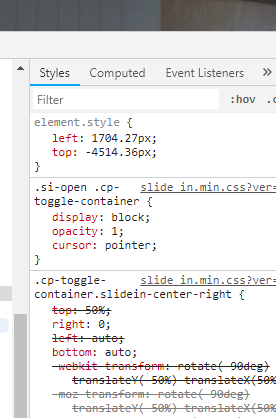
Please add this CSS to Theme Options > CSS to override it back again
.cp-toggle-container.slidein-center-right {
    top: 50% !important;
    left: auto !important;
}
Do you have custom javascript that alters element positioning?
Hope this helps.
Perfect, that did the trick except that I had to add a class for the slide in to prevent it doing the same jump as the button.
.cp-toggle-container.slidein-center-right, .cp-slidein.slidein-center-right {
top: 50% !important;
left: auto !important;
}
Hello Melker,
Is everything sorted now? Feel free to let us know if you have other question.
Thank you.
Yes working perfect!
Glad to hear that. Have a great day! 
This topic was automatically closed 10 days after the last reply. New replies are no longer allowed.