Superfly Menu: Cannot target CSS on second and third levels

Hello,

Let me give you a description of what I am trying to achieve and then the issue I am having trying to get there.

I have a three level SuperFly Menu installed on a client’s website, we want to use the same background colour for each of the levels (no problem there), but to make the levels look distinct, I want to put a 1.5px border between each level. I have found the following CSS has the desired effect on ‘main’ level one:

.sfm-sidebar-slide #sfm-sidebar:not(.sfm-fully-hidden) {
border-left-width: 1.5px;
border-left-style: solid;
border-left-color: #4F5064;
}

However, I cannot find the CSS required to target levels 2 and 3 of the menu. I have a suspicion I need to create something similar to the above but changing these parameters: (#sfm-sidebar:not(.sfm-fully-hidden)

I have spent some time using Google’s inspector but I have not found what I need.

Any help greatly received.

Thank you!
Hello @littleshock,

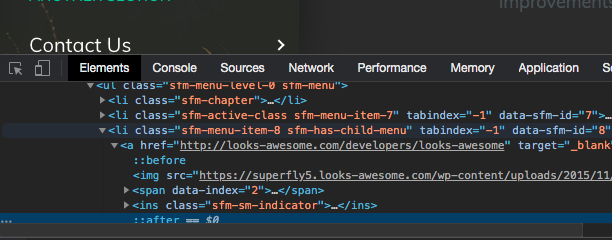
Thanks for reaching out to us. To get your issue resolved, You need to use the Google Chrome Developer Toolbar to check the live HTML code and find which CSS selector you need to use.You need to use the Google Chrome Developer Toolbar to check the live HTML code and find which CSS selector you need to use.

For example:
Screen Shot 2020-12-12 at 4.56.07 AM

Hope this helps.

Hello,

This is exactly what I have been doing and how I found the correct CSS class for: .sfm-sidebar-slide #sfm-sidebar:not(.sfm-fully-hidden)

However, I have systematically been through every visible class in Chrome’s Dev tools and none of them appear to target the second and third menu levels. I have take every visible class and applied:

.class {display:none;}

This does not remove either the second or third menu levels, therefore none of the available classes can be correct? I am unsure of how to find correct targets. I was hoping you would have an idea of which classes to target? I have a feeling that the classes are not visible unless some form of interaction takes place, but I could be wrong.

This is on a staging site, so I can provide you with credentials to login if you need to see the setup.

Thanks for your help.

Hello @littleshock,

Please check out the following articles to figure out how you can add CSS to nested elements.

Note: We are unable to provide support for customizations under our Support Policy.

We are unable to provide CSS code for the customization as it is outside of our support scope. The points above will be a good starting point and if you are interested you can learn more about CSS selectors and details here.

This topic was automatically closed 10 days after the last reply. New replies are no longer allowed.