Superfly flyout submenu / unable to change css cell background color

Hi,

My head hurts from trying to get this to work.
Used the Superfly Menu custom rich content to add some html based on a table I created for modal popup already on the site, but I’m unable to get rid of the cells’ background color. Client just wants it all white with black font and same format as the popups (table). Pretty sure there’s some css overriding the background somewhere :frowning:
Then will have to figure how to add a hover color to the text (all links will go to separate pages)

Could you help me figure out where the problem is?
I can change the font color to black, but can’t get rid of the dark gray and blue on hover background.

Thanks in advance.

Hey Daniel,

Would you mind giving us some screenshots along with your description so we have a better picture of the issue? As I understand, you want to turn the dark background to white.

The dark background is coming from Superfly’s inline CSS for td. Looks like there is not option for it so you’ll need to override that with your own CSS.

I see your table has this class my-table2. You can use it to override Superfly’s CSS like this:

.my-table2 td { background: white; }
.my-table2 td:hover { background: red; }

You can put your CSS in Superfly Menu > Advanced > Additional CSS. I see some CSS in there already so I assume you already know this.

Thanks.

Did not explain this correctly. The two popups on the video are fine.

This is related to clicking on the “Our Expertise” “Industries We Serve” in superfly menu -> submenu flies out with these categories which will be linked to their respective pages.
I’d like to override the cell/cell/hover color as well as changing link color on hover.

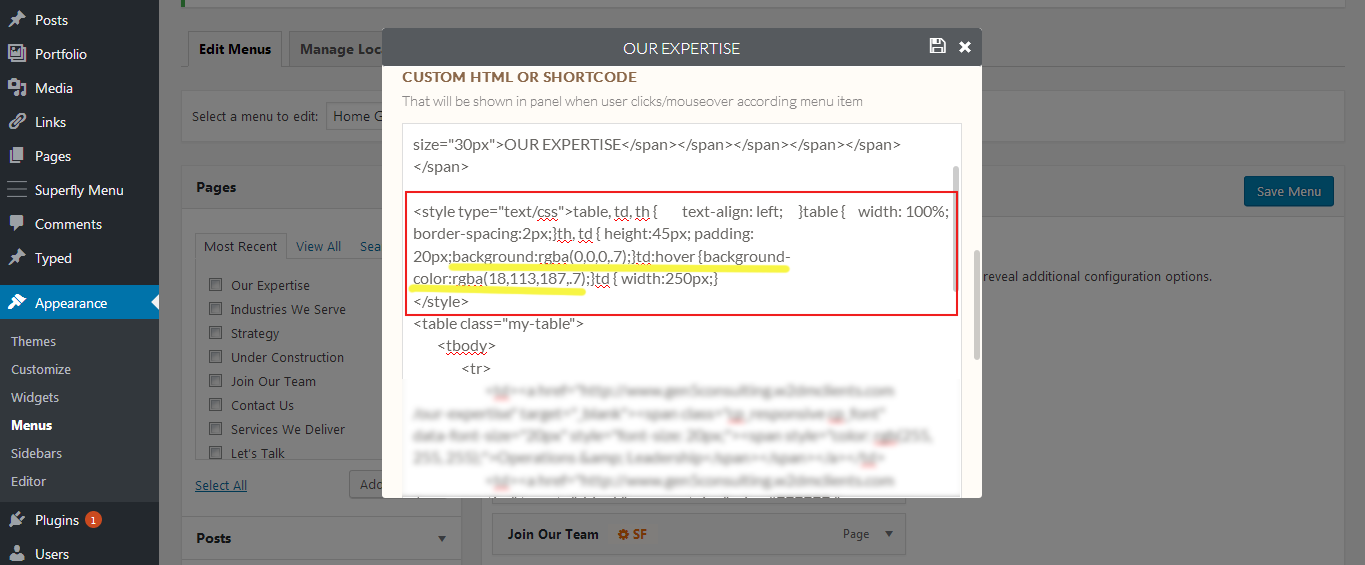
Here is the HTML in Superfly menu. Changing the background and :hover doesn’t work, probably because table or cell are defined in theme css from the main color theme?

To clarify as well, don’t want to change the current colors in popup modals, just superfly submenu. (reason why I called it table2)
Will try to add the CSS you provided to superfly advanced. Sorry for this convoluted explanation, as you can tell, not a pro when it comes to coding :wink:

UPDATE:
It all works! Had to add custom css under theme css to get rid of the lines, but it all works.
Thanks so much for pointing me in the right direction! You’re awesome :sunglasses:

On behalf of my colleague, you’re welcome. Cheers! :slight_smile:

This topic was automatically closed 10 days after the last reply. New replies are no longer allowed.