Submenu items not accessible from mobile platform

Can you help me with sub menu items not working on a mobile platform. When tapping on the parent menu, the sub-menu items do not display. This occurs when the submenu items are children of a parent custom link. The url for those custom links is #menu-top-menu. The site where this is occurring is http://cdt2016.boatmanwalking.com

Thank you for your assistance.
Hello Jim,

Thanks for writing in!

Please edit your menu and change the custom link to # only.

Hope this helps. Please let us know how it goes.

Thank you, but I used #menu-top-menu because with just “#”, clicking on the parent menu causes the page to reload at the top. Since the page loads initially with the slider and you scroll down to the menus, I need the parent menus to stay in the same position as the menu when they are clicked. Make sense?

Hello Jim,

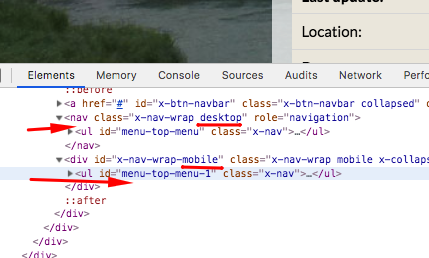
The problem is that the desktop menu is using “menu-top-menu” as the ID. In smaller screens or the mobile menu is using “menu-top-menu-1”.

Both of the desktop and mobile menu is using the same menu but they differ in the ID name. As you know, element ID name must be unique. This is why in smaller screens, the “#menu-top-menu” do not work. It is not visible or disabled in smaller screens.

Hope this explains it briefly.

Thank you for your help. Not the solution I was hoping for but I understand. I think I’ll go away from “unclickable” parent menus and make them actual pages.

You are most welcome Jim!

This topic was automatically closed 10 days after the last reply. New replies are no longer allowed.