Submenu doesn't auto collapse anymore

After updating to the latest X Theme version, my submenus don’t auto collapse anymore when I move my mouse off them. This is a big annoyance as the menu is obstructing the view of the page. Before I updated, the menus would automatically close when the cursor moved off them.

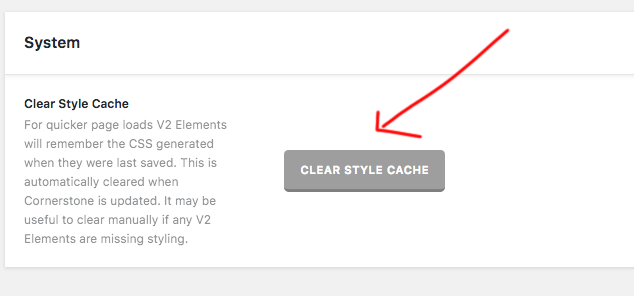
Hi There,

Thanks for writing in!
Can you please clear your style cache in Dashboard -> X-> Setting

Also Can you confirm if you have updated cornerstone too?
You can also try disabling third-party plugins for a possible conflict.

If that doesn’t help please send us your login details in a secure note so that we can have a look.

Thanks

Hi there,

I’m having the same challenge as well and regularly use this theme for client websites, so would love to hear any updates on a solution.

The issue looks to be with whatever is adding the ‘x-active’ class to menu items that have child items. The class is added on hover but isn’t removed when you stop hovering.

Would someone mind sharing a public reply with any solution (even a stand-in) if one is found?

Thanks!
Ryan

Hi there,

This issue has been confirmed as a bug and is fixed for 2.1.3 which we are going to release shortly.

Thank you so much Alexander! I know you can probably only speculate but any idea on when this release might go out? I just need a rough idea, not an official company stance.

Thanks again.

Hi @Launch48,

Update has been released, you can update X and Cornerstone to the latest version to fix the issue. Please see https://theme.co/changelog/

Cheers!

Hi Nabeel,

I just updated Cornerstone and X on my client’s site, and the issue is resolved. Thank you!

Glad it’s resolved.

Cheers!

This topic was automatically closed 10 days after the last reply. New replies are no longer allowed.