Hello,
How can I customize my submenu on desktop view? It isnt directly below the navbar item and there is a gap between the submenu and menu.
Thanks
Hello,
How can I customize my submenu on desktop view? It isnt directly below the navbar item and there is a gap between the submenu and menu.
Thanks
Hello Darien,
Thanks for writing to us.
To reduce the gap between Menu and Submenu, you need to go to X—>Theme Options —>Header–> Top Height. You need to reduce the Heigh from here. Please have a look at the given screenshot below.
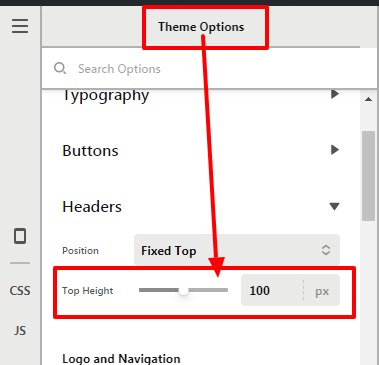
OR
You can use custom CSS as well to reduce the gap between menu and submenu. For that you need to add this custom CSS code under X—>Theme Option–>CSS
.x-navbar .desktop .x-nav > li ul.sub-menu {
top: 70px;
}
The purpose of providing the custom CSS to show you how to add CSS code to your site. Writing custom CSS is outside the scope of our theme support. If you need more customization, you need to learn CSS and learn how to use the browser’s element inspector.
Hope it helps.
Thanks
That helps thanks! The Inspector is very handy.
Thanks again.
Hi Darien,
Glad that we are able to help you.
Thanks
This topic was automatically closed 10 days after the last reply. New replies are no longer allowed.