Sub menu not disappearing on second tap on mobile

I have a sub menu that on the first tap opens, but on the second tap does not close.

I tested this with the parent theme activated and the child theme de-activated, no plugins activated, the theme, wp, php all up to date, and all my js in the page and theme builder de-activated.


I’m testing on an iphone7+.

Specifically the menu item in question is “Services” in the footer sticky menu.

Hi Alex,

Thank you for writing in, is that Services menu is an inline element? It seems to have a different markup from the hamburger menu on the right, I assume that is not an off-canvas element. Is it a custom script?

Please provide us login credentials on a “Secure Note” so we can take a closer look.

Thanks,

Services menu is an inline menu element. The hamburger menu is an off-canvas element. It is NOT a custom script.

Hi Alex,

Thanks for the credentials, but the Navigation Inline element does not have that sliding sub-menu behavior by default, so there much be a custom script added on it, I can see you have a lot of custom scripts on the Global JS and on the Header JS area, regretfully we cant dig deeper from here, you might need to contact the developer who added that sliding sub-menu behavior to the inline menu element.

I advise replacing/rebuilding that Navigation Inline element with an Off-Canvas menu instead same as that hamburger menu, but with text (services) instead of the hamburger icon. All toggle elements including the button has a text setup and an icon setup, you can have either one of it, or have both.

Thank you for understanding,

Hello @Friech,

You have been speaking to the developer and contrary to your opinion it doesn’t “must be a custom script”. There is no custom script. There is a little bit of css that changes the default slider behavior of sliding up to instead making it slide over. I deactivated all the js in the global js and header js and the problem persists, though this should be of no surprise as I mentioned I had done this while trying to troubleshoot this issue in my very first message.

The theme script is toggling the class ‘x-active’ and I’m styling based on the absence/presence of that class. The inconsistent toggling of the class is the issue.

I’m given no confidence in your ability to provide me any useful support given your lack of reading comprehension and apparent ignorance of basic CSS. I would like you to hand this over to your manager, so that I may be provided adequate support.

Hey @alex5252,

We apologize for the confusion. The Navigation Inline menu should do the job like you’ll see in my video below comparing your setup and mine.

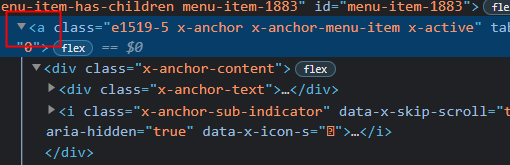
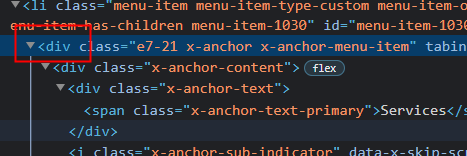
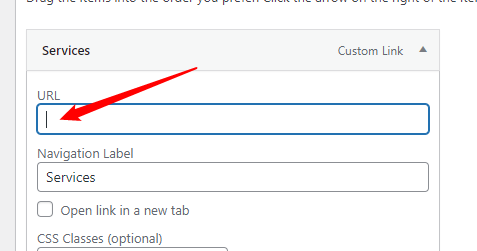
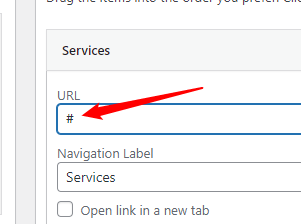
The only difference I see is in my Navigation Inline, the parent item is an anchor <a> while your’s is a <div>. This is the reason why it’s not closing and this was caused by an empty URL in the menu. Putting a hashtag inside the URL brought it back to being an anchor and now the menu works. Empty URL will also cause a link issue in Safari so the hashtag needs to be in place.

image

image

image

image

Hope that helps.

Hello,

I do have a little js that just switches the to a

if the doesn’t have an href. Didn’t want to have anchors that went nowhere for ADA purposes. I suppose I could have switched the tabindex to produce the same result but that seemed

It wasn’t working even when I deactivated it before, but third times the charm of course, I de-activate it today and now the services menu item works just fine. Seems for some reason pro was not saving correctly before. There isn’t any cache or anything on the site yet, so not sure what was going on.

I still don’t like the idea of just switching the tabindex, seems like digging a whole just to fill it, but It seems like that’s the only way this is going to work.

If I have any further problems with this I will respond to this thread.

Hi @alex5252,

Great! If you have any other concerns or clarifications regarding our theme features, feel free to open up a new thread.

Thank you.

This topic was automatically closed 10 days after the last reply. New replies are no longer allowed.