On this sub navigation, how can I get the navigation to expand inline instead of off to the left as seen here.
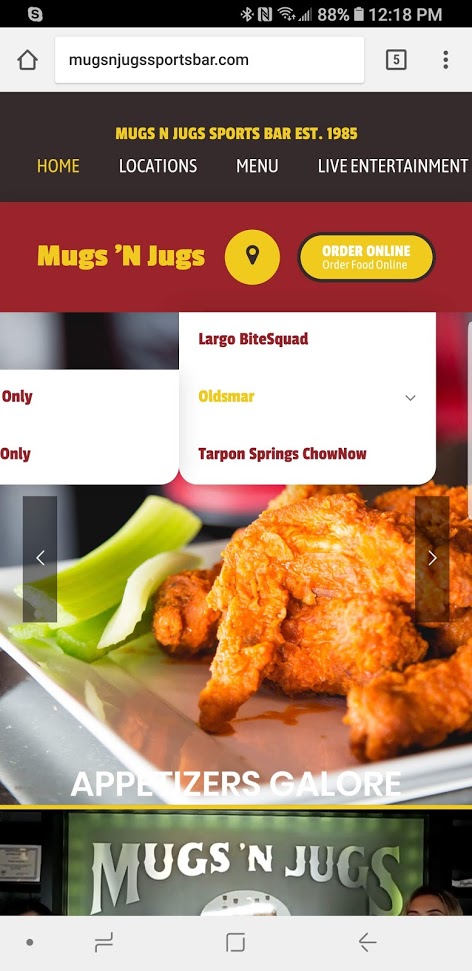
On this sub navigation, how can I get the navigation to expand inline instead of off to the left as seen here.
Hi There,
Please try adding this custom CSS under Theme Options > CSS:
ul.sub-menu.x-dropdown {top: 100%;right: 0}
Hope it helps 
That kind of worked. Can it “push down” the menu instead of covering it?
Hi again,
Try replacing the previous code with the following code:
ul.sub-menu.x-dropdown {
    top: 100%;
    right: 0;
    position: relative;
    display: none;
}
.menu-item-has-children:hover > .sub-menu {
    display: block;
}
If you would like to learn CSS, I am sharing few resources that you take a look to get started with CSS and an interesting tool that you can use to speed up the development process.
I recommend you to watch following video that will help you to get started with CSS.
Sometimes it can get a bit difficult to find out the right selector to be able to write the required CSS codes. A handy tool that can help you in this is Google Chrome dev tools. I am sharing the resource that you can refer to get started with dev tools.
https://developers.google.com/web/tools/chrome-devtools/css/
Cheers!
Perfect! Thank you!!!
You’re most welcome
This topic was automatically closed 10 days after the last reply. New replies are no longer allowed.