I would like to be able to style my secondary sub-header navigation in Pro differently than the sub-menu
Can you provide the necessary CCS to do this?

I would like to be able to style my secondary sub-header navigation in Pro differently than the sub-menu
Can you provide the necessary CCS to do this?
Hello There,
Thanks for writing in! You can make use of this code to be able to have a different colors for the 2nd level sub menu;
.x-dropdown .x-dropdown {
    background-color: grey;
}

.x-dropdown .x-dropdown li{
    border-bottom: solid 1px red;
}

.x-dropdown .x-dropdown .x-anchor:hover {
    background-color: blue;
}

.x-dropdown .x-dropdown .x-anchor .x-anchor-text-primary{
    color: yellow !important;
}

.sub-menu .sub-menu .x-anchor:hover .x-anchor-text-primary{
    color: cyan !important;
}
Please let us know if this works out for you.
Yes, this works. Thank you.
One final question:
Is there any way to have the second sub-level menu positioned underneath “French Oak” instead of a flyout?

Hey,
To answer your last question, you`ll need to provide us your website link.
Hi There,
Upon checking your website seems you already achieved it what you were looking for.
If you are seeing differently from the screenshot below, please clean your browser cache and test it again.
Thank you
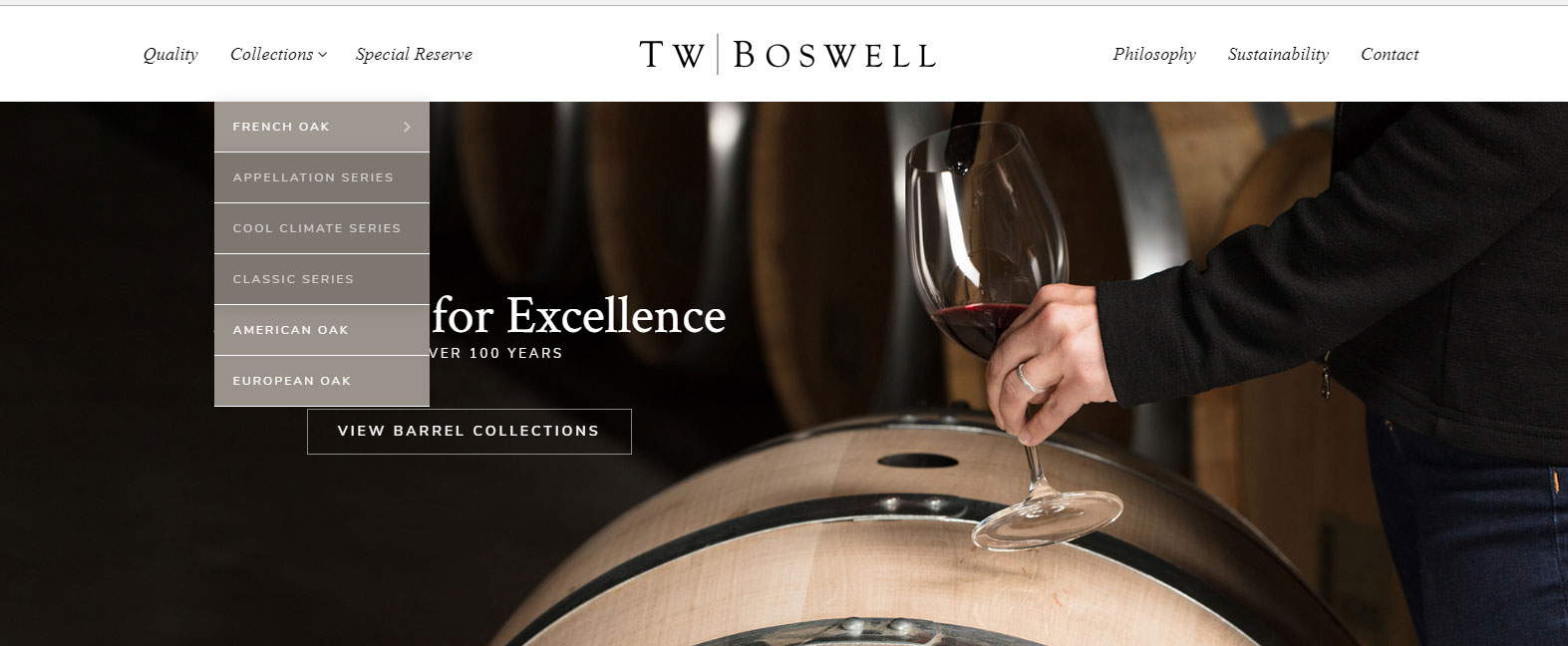
Yes, thank you. My only concern now is that after scrolling over classic series to American Oak the menu collapses. Any ideas on how to fix that issue?
Hi there,
Menu items and its submenu are triggered by hover, moving away your focus is the same as triggering hover out which will toggle the sub-menu back.
You only changed the position your sub-menu directly under its parent, but it doesn’t change the way how javascript works. The current menu isn’t setup for that. You should remove this
.sub-menu ul.x-dropdown {
    left: 0;
    position: relative;
    display: none;
}
Thanks!