Is there a chance to change the styling of the sidebar? E.g. to remove the framing, change the alignment to the right side, change the hover effect?

Is there a chance to change the styling of the sidebar? E.g. to remove the framing, change the alignment to the right side, change the hover effect?
Hey Mardas,
Thanks for posting in!
Do you want something like this?
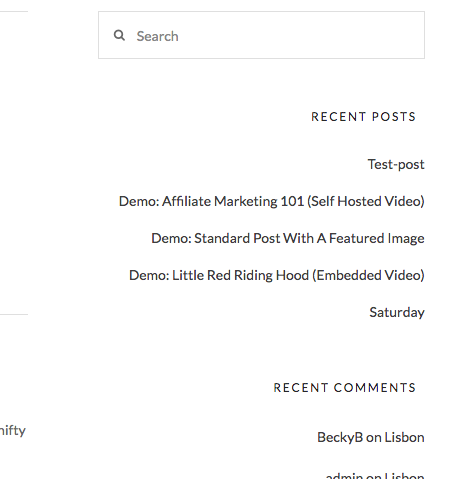
If that is the case, please add the following CSS code in the X > Theme Options > Global CSS (http://prntscr.com/evui3r)
.x-sidebar .widget,
.x-sidebar .h-widget {
    text-align: right;
}

.x-sidebar .h-widget,
.x-sidebar .widget ul li,
.x-sidebar .widget ol li {
    border: none !important;
}

.x-sidebar .widget a,
.x-sidebar .widget ul li a {
    text-decoration: none;
}
We would love to know if this has worked for you. Thank you.
Awesome!
I would like just to further style the text elements like RECENT POSTS, RECENT COMMENTS and apply the font-weight: bold.
My problem is I cannot identify those elements. Can you advice what is the right naming for those elements?
Many thanks and best regards,
–Mardas
Hey Mardas,
Because it is not feasible to document all the classes used in our products, it is necessary for users to know or learn how to use the browser’s inspector. With that knowledge, you’ll be able to see the selectors you can use to customize any website. Here’s Chrome’s documentation: https://developers.google.com/web/tools/chrome-devtools/inspect-styles/
I’ll provide the code you need for now but please note that further custom coding would be outside the scope of our product support. Here’s the code:
.x-sidebar .widget a, .x-sidebar .widget ul li a:link {
    font-weight: bold;
}
When copied completely, it should work. See https://youtu.be/J20HEHX7shA
Hope that helps.
This topic was automatically closed 10 days after the last reply. New replies are no longer allowed.