Hi I have this site www.talenthealthclub.com and in cornerstone the background keeps turning grey and the format is not correct. Although the site looks normal on the front end. Please login to admin and help me fix this issue.
Hi There,
Thank you for writing in! We can not login to your site without credentials, you can provide us login credentials on a secure note.
Please check your page content for any unclosed HTML tags, also check all your custom CSS for an unclosed block, you can check your custom CSS here. Please check all your custom CSS in Page CSS, Theme Options CSS, Header CSS, Footer CSS, and child theme style.css (if any).
Hope it helps,
Cheers!
Hi there,
I checked your website and installed the Duplicate Post plugin to clone your STORE page and use that as my testing page.
The first thing I did was to delete the section which contains the Revolution Slider and the background was still there. That made me realize that the image should be added to the page background. That is why I clicked on the settings icon in the Cornerstone:

And on the x-settings tab I found out that the background option has a link to the gray image in question:
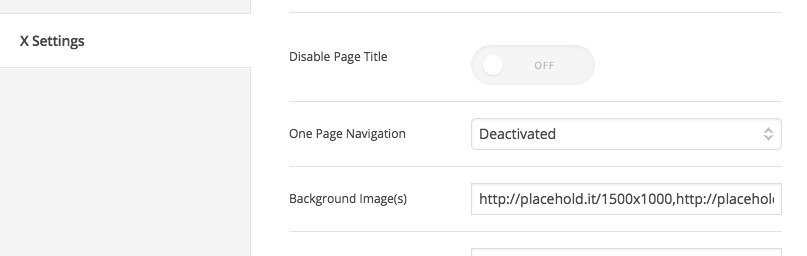
I removed that and saved the page and the gray image is gone in the Store Test page.
You need to do the same for the main page, I think the problem was that you used a demo page and worked on that and forgot the option was therefor that specific demo page.
Thank you.
This topic was automatically closed 10 days after the last reply. New replies are no longer allowed.