Stop initial animation of header made w. header builder

Hi!

I don’t like how content disappear under my header so I’ve given content a 100 px top margin. The initial animation of the header “falling down” from the top exposes an ugly white space of nothingness underneath the header. How do I remove that animation?

http://dev.monroedesign.se/

<3

Hello There,

Thanks for writing in! I have taken a closer look at your header and that space you were referring about is the direct result of your custom css code:

.entry-content {
    margin-top: 100px !important;
}

If you remove this, you would see a difference and the white space would be eliminated. The animation by the way is the movement of the bar from being relative to a sticky bar as you hover the page.

Hope this helps.

Hi!

Right, I put the custom margin-top 100 px there for a reason. The entire site is built for a header that does not steal space from hero images and portfolio top navigation etc. I need to keep that code. I do need new code (JQuery(?)) to stop that movement in the header. There must be a simple way to stop it.
<3

Hi @Lobsterass,

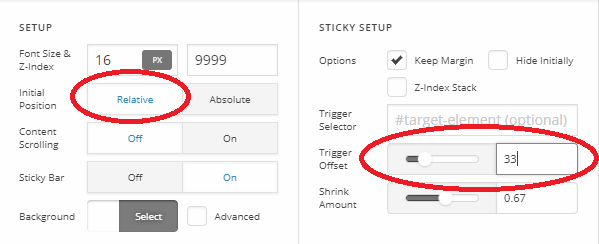
Please remove that CSS then set its positioning to relative instead of absolute. Then make it offset trigger to 33 (height of the topbar).

Thanks!

1 Like

Much better! Thank you very much!

<3

You’re most welcome!

1 Like

This topic was automatically closed 10 days after the last reply. New replies are no longer allowed.