Stop hyperlink colour

Hi there,

When I attach a link to a bit of text it automatically turns red. I understand that this is setting that you get with the Icon stack.

However, if I wanted for a particular bit of text to not go red (for example, the three links in the bottom right of the footer here https://thelanguagesherpa.com ) how would I stop the colour change?

Thank you!
LS

Hello @riugn557,

Thanks for writing in! :slight_smile:

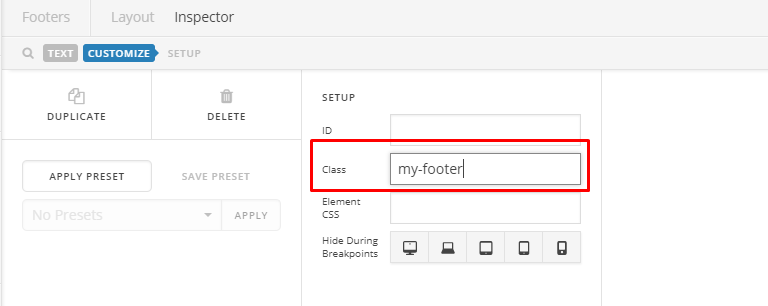
Please select the text element and go to Customize tab of your footer.

Afterwards, add a class. E.g. my-footer

Then, go to Pro > Theme Options > CSS

/* This is the text link color */
.my-footer a {
    color: #000 !important;
}
/* This is the text color when 
cursor has been placed on your text link
*/
.my-footer a:hover {
    color: #eee !important;
}

You can change the color values above to your needs. Please don’t forget to read the notes between /**/ to understand what each line of code pertains.

Hope this helps. Thank you!

That’s brilliant, thank you, Jumar! :slight_smile:

Glad we could help.

Cheers!

This topic was automatically closed 10 days after the last reply. New replies are no longer allowed.