Sticky header not sticking as expected // mega menu

I’m recreating a header/footer configuration that I’ve used on this site: Healthy Amarillo Women This header is sticky while the one I’m trying to recreate hides then reappears when I’d like it to stay fixed.

I’ve reviewed the settings to all bars and everything appears to be the same. I’ve also cleared the cache with WP Engine and the style cache. Clearly I’m missing something and I was hoping you’d be able to provide the fix.

While you’re inspecting the header, I’m also having trouble adjusting the Services mega menu.

I’d like to move the menu down so it appears below the blue topbar. I also tried to change the background color of the first two divs, but nothing took.
Hey @WaggingLabs,

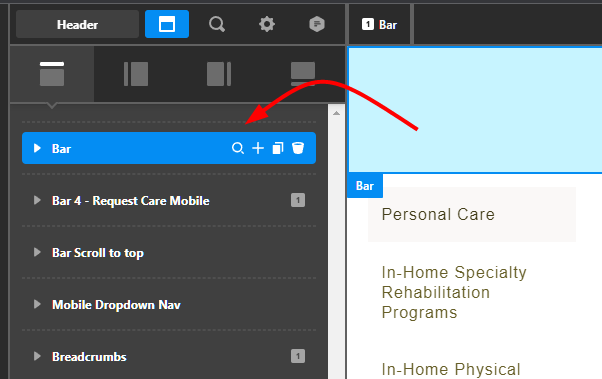
For your sticky header, it must be positioned as the 1st bar.

image

For the Mega Menu, increase the Height of the Toggle to 100%.

Thanks.

Thanks @christian for your quick and helpful reply :slight_smile:

How would I go about moving the particle to be at the same height as the inline nav?

Hello @WaggingLabs,

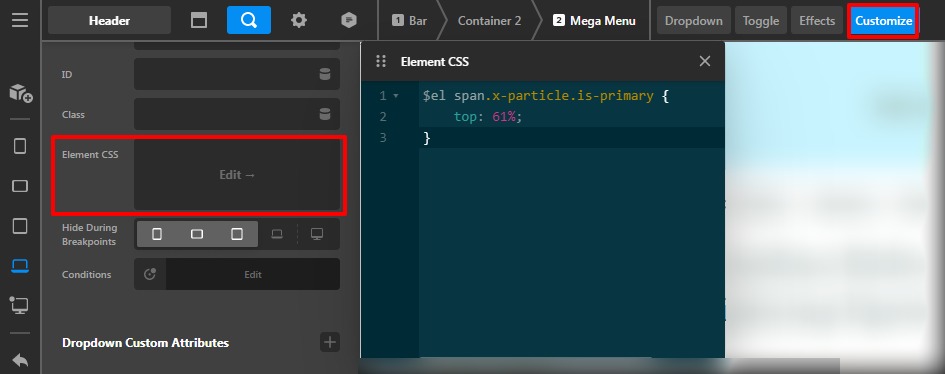
It can be achieved through the custom CSS code you need to go to the Mega Menu Element —>Customize —>Element CSS

$el span.x-particle.is-primary {
    top: 61%;
}

Please feel free to change the top value as per your design. The purpose of providing custom CSS is to show you how to add CSS code to your site. Writing custom CSS is outside the scope of our theme support. If you need more customization, you need to learn CSS and learn how to use the browser’s element inspector.In case if you have no idea about coding you can subscribe to One where customization questions are answered.

Hope it helps.
Thanks

This topic was automatically closed 10 days after the last reply. New replies are no longer allowed.