Stats counter delay

URL: https://learningleader.com/

Have had users of this site report that sometimes the counter numbers remain at 0. I’ve loaded and reloaded the page several times, and haven’t seen that behavior, but have detected a delay that sometimes keeps them at 0 until the page is scrolled to where the numbers are right at the top of the page about to disappear.

I’ve looked through the element settings and can’t find anything to adjust to modify this behavior. Any ideas?

Thanks.

Hi @lancesalyers,

Thank you for writing in, the issue is very inconsistent it seems to have something to do with caching, please clear all your caching, minifier, optimizer plugins or CDN feature and your browser’s cache as well.

If that did not work, try adding this to Theme Options > CSS

.x-masthead.ls-overflow-visible {
	min-height: 100vh;
}

Hope it helps,
Cheers!

Unfortunately, that didn’t work. I cleared the cache and added the code to the Theme Options > CSS as described. Here’s the result:

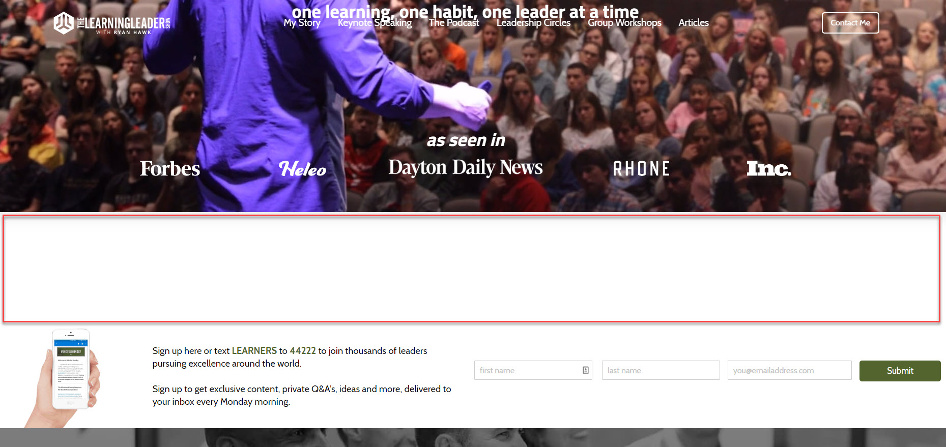
The counters are still not activating until I scroll them up to the very top of the screen…

… but the code did add this extra white space between the hero video and the next section/row:

Because of that extra white space, I had to remove the code, so if you check, that’s why it isn’t there now. :slight_smile:

Hello @lancesalyers,

You are having a cache and minified files issue. Please clear your cache and regenerate the minified JS and CSS files first before testing the site. I would also recommend that while troubleshooting, you may temporarily disable any caching or minify plugin that you have installed.

You also need to clear your browser cache or use private browsing mode and test your site again.

This topic was automatically closed 10 days after the last reply. New replies are no longer allowed.