Hi there. Would you be so kind to let me know why there is a space between cell 1 and 4 or 3 and 4 in the grid at /about? See image. Thanks.

Hi @nblund,
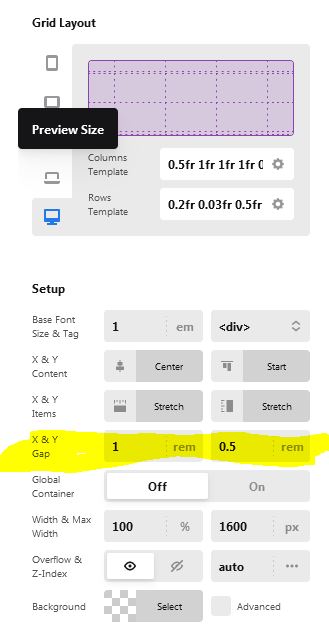
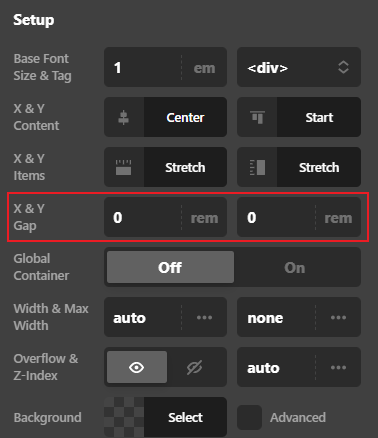
Thank you for reaching out to us. To adjust the gaps, inspect your Grid element in Content Builder, under Setup adjust X & Y Gap values as you need (see screenshot)
@VRANKOVINA Thank you helping 
Hope this helps!
Thank you for helping out. Unfortunately, the answer doesn’t solve the puzzle. Referring to my image the top and bottom are both two cells of the same grid, and the x&y gap of the grid was both set to 1rem. In the page builder (back-end) is displays as it should, but not on the front-end. Any ideas? Thanks.
- Do you use flexbox “ON” for the specific cell?
- Did you set the vertical row size of the cell to some strict value or auto?
- Do you have some margin or padding settings on the cell element or the content element?
- it looks like the content of one cell is an image. Do you use this image as an content element or cell background?
I’ve learned that there is inconsistency in the rendering of the grid element in the editor and front end. Especially if you use the MS Edge. Don’t get me started about the old explorer pls. 
Hi @vrankovina. See answers below:
- Do you use flexbox “ON” for the specific cell? No
- Did you set the vertical row size of the cell to some strict value or auto? No
- Do you have some margin or padding settings on the cell element or the content element? No
- it looks like the content of one cell is an image. Do you use this image as a content element or cell background? Cell background with a CTA on top.
I appreciate the all the comments, thank you. However, none of them solved the puzzle. So I went on and copied the last cell of the grid to a new grid, then deleted the very same cell in the first grid to achieve the layout.
Thanks
Hello @nblund,
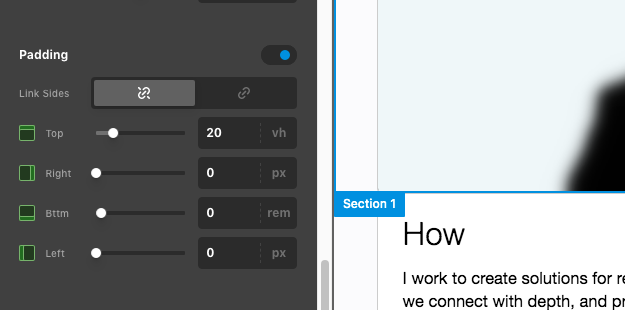
The empty space is coming from the 1rem bottom padding of the first section.

Remove the padding or set it to 0.
Best Regards.
Hi again. Appreciate your time. As you know, I went ahead and made two grids (although that shouldn’t be necessary) to get around the space issue. So looking at it now wouldn’t make sense any longer. Let’s close this one. But, for your information, your answer is definitely not the answer, because when this ticket was filed, there was one grid in the same section. Have a nice day.
This topic was automatically closed 10 days after the last reply. New replies are no longer allowed.