I was wondering how to remove the little green triangle from the top right of the Spa Demo Theme. I can’t seem to find the option…or even what it is for. It acts like a dropdown nav but I can’t seem to get anything to display in it.
Thanks

I was wondering how to remove the little green triangle from the top right of the Spa Demo Theme. I can’t seem to find the option…or even what it is for. It acts like a dropdown nav but I can’t seem to get anything to display in it.
Thanks
Hey @AdornBoise,
To disable it, Login to your admin panel, Browse to Appearance >> Customize >> Header, Scroll down to widgetbar and select Header Widget Areas to none.
If you want add content to, Add widgets in header sidebar.
Hope this helps!
Regards
Gah! That was simple, obviously I missed that option… Many thanks for the help and speedy reply.
guys how do I link the x pricing table button to another page?
Hey @Blingyz,
Please take a look at this screenshot you need to add page URL in href="#" section by replacing #.
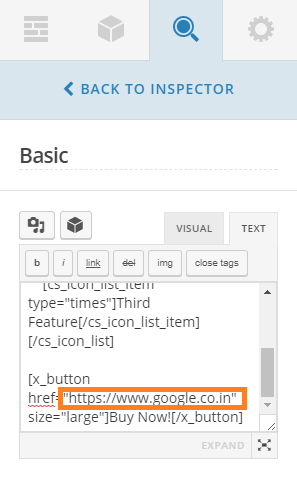
And one more thing it will be better if you can create a new topic for totally different question  It will help other users to search the solution!
Regards
Really glad that I could be of help!
Cheers!