Some page styling help

Hi guys - could you take a look at this page?
https://techologysolutions-inc.com/

Issues I’m having:

On the header, I’ve used CSS that’s worked with X in the past to remove the hover-bars over the header menu links, and remove the rule and box shadow under the header, I’ve added some margin and added a heavier rule beneath the header.

This looks fine in the theme options view, but doesn’t show up in the cornerstone editor or the browser. What have I missed here?

On the “click here to order today” link (in the red band towards the page bottom), I can’t get color and hover to work. Color should be white, it appears so in the theme options but it renders different colors, sizes and fonts depending on the browser. Hover colors don’t work.

I’ve given it a class of “CTA”, but when I check it with web inspector, the class doesn’t show up, so I’ve tried various ways to get the class to work. This has always worked OK in older versions of X, so I’m stumped.

Thanks for any help!
Hello @mcphoto,

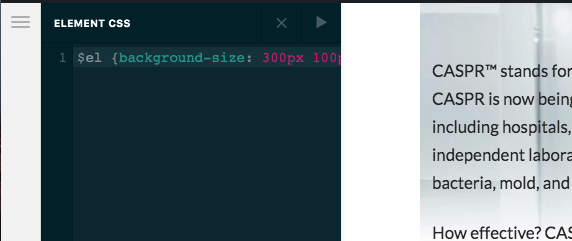
Thanks for writing in! You are having this issue because in one of the sections, you have added a broken css code:

$el {background-size:300px 100px;

4WAEJTJDTQOJQIT_Qs6EDA

I went ahead and already fix the issue. Kindly check your page again.

Thanks a million, looks good!

You’re welcome!
We’re glad we were able to help you out.

Hey, a quick question for you - is there a way to search and find CSS errors quickly? there are so many places within an X site where code can be entered, it can be difficult to find a missing bracket as you did.

Hi @mcphoto,

There is no exclusive search feature for that. But in general, I suggest that you add your CSS code after you make sure it is 100% correct.

You can do that using an online tool such as this one, or use a good text editor such as Sublime text to do so.

The following is a cool article to see how you can make the best of the Sublime Text:

Thank you.

This topic was automatically closed 10 days after the last reply. New replies are no longer allowed.