The social media icons, “hamburger” menu button, and arrows are not working on home page. They simply show up as a rectangular box with an X. This only happens when you go on the homepage. Bluestarmarinefl.com
When you click on any of the tabs, it shows all icons. This happens on Android mobile devices and some desktop browsers. What could this be?
Hi There,
Thank you for writing in, You’re having a Cross-Origin Resource Sharing (CORS) issue. That means this URL http://bluestarmarinefl.com/ is blocking the resources coming from http://www.bluestarmarinefl.com/ yes even if they’re referring to the same site. Basically, your site is blocking its own resources (fontAwesome) that is why the icons are not showing up.
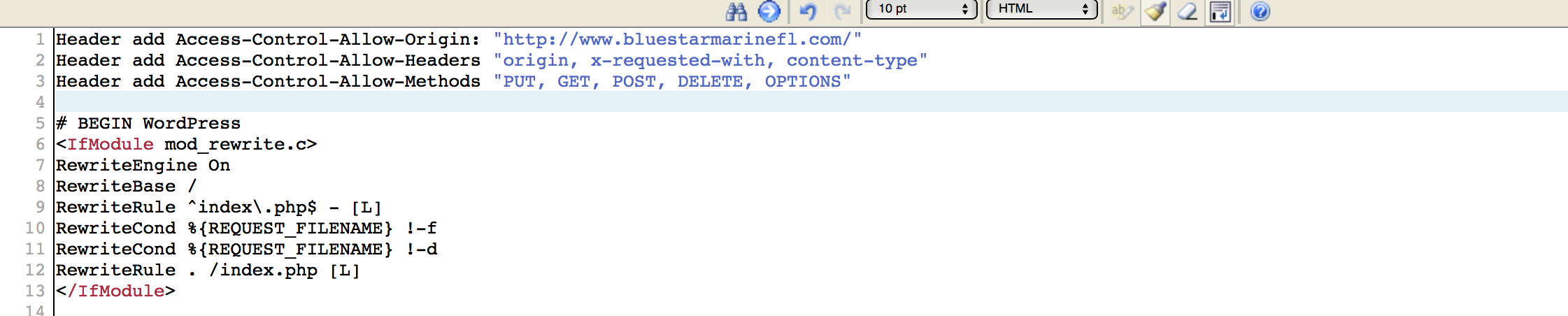
Please access your .htaccess file via FTP and add the lines below in there.
Header add Access-Control-Allow-Origin: http://www.bluestarmarinefl.com/
Header add Access-Control-Allow-Headers "origin, x-requested-with, content-type"
Header add Access-Control-Allow-Methods "PUT, GET, POST, DELETE, OPTIONS"

Let us know how it goes,
Cheers!
I tried it out and it didn’t work… I added “” around Header add Access-Control-Allow-Origin: http://www.bluestarmarinefl.com/ and it still didn’t work. I deleted cache of chrome but it still comes out with x for social media icons…
Hi There,
It seems to working fine:

Can you confirm with me?
I’ve already checked on my Window 8.1 & iPhone 7 as well.
Regards!
Yes it is working now across devices… Was it the fact that I installed a WP Super Cache plugin or the fact that I added: Header add Access-Control-Allow-Origin: http://www.bluestarmarinefl.com/
Header add Access-Control-Allow-Headers “origin, x-requested-with, content-type”
Header add Access-Control-Allow-Methods “PUT, GET, POST, DELETE, OPTIONS” to the htcaccess file?
Either way appreciate the help!
You are most welcome. 
This topic was automatically closed 10 days after the last reply. New replies are no longer allowed.