Small work area in blog post

I think I’ve brought this up before in others posts but the active area in the standard blog post is just cartoonishly small:

How do I widen out the content area if I wanted and is there a way to get rid of the sidebar all together on a blog post
thanks!

Hi John,

There is a default 3% left and right padding in the content area of the blog posts that you can override through custom CSS so kindly add this code in X > Theme Options > CSS:

.single-post .entry-content {
    padding: 0;
}

You may also disable the column container of the Row setting to have the content of the sections fill the entire content area:
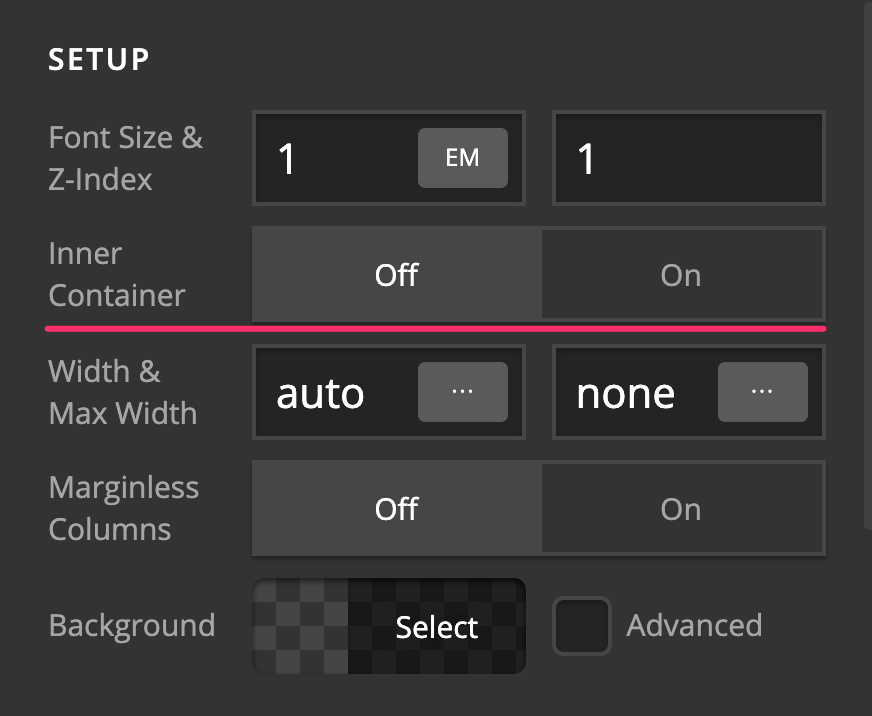
To further increase the width of the content area, you may add this CSS code as well:

.single-post .entry-wrap > .x-container {
    width: 100%;
    max-width: 1350px;
}

Kindly note that since this is a custom code that changes the default behavior/display of the theme, you will be responsible to maintain or update the code in case you require further changes or if the code stops working in future updates. If you are uncertain how to proceed, it would be best to get in touch with a developer.

Hope this helps.

Thanks for the help defiently a step in the right direction:

I added all 3 of the suggestions above but what I’m trying to do with my blog post is come up with a hero image (that runs a 100% of the width) at the start of in the top section under the title. is there a way to do that?

Thanks

Hello John,

Thank you for the clarifications.

To accomplish what you have in mind, please set the width of the image element to 100%.

And then find the “Customize” tab and insert this element css:

$el img{
  min-width: 100%;
}

This code will make sure that the image will be 100% width.

Please let us know how it goes.

Worked like a charm you guys are great, thx for the support! :grinning:

You are most welcome. :slight_smile:

This topic was automatically closed 10 days after the last reply. New replies are no longer allowed.