Small different problems on page

Hello,

I have a few questions for this website.

  1. Is there a way to only change the color of the email and phonenumber of this website, without changing the color of the “Service” and the “About”? If I change the color, both all four things change. I only want to change the color of the email and phonenumber. See the images below.

  1. Is there a way to only remove the LinkedIn logo in the top of the website without removing the logo in the bottom of the website?

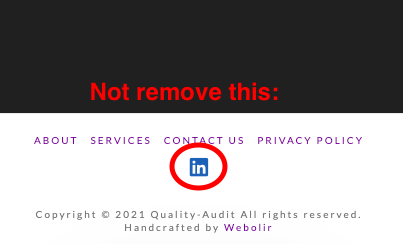
Screen Shot 2021-06-01 at 10.51.28

Screen Shot 2021-06-01 at 10.51.56

  1. Only change the color of the links on the website in the footer, and not anywhere else on the website. See the image below

Thanks for your reply in advance!

Hello @oscarbnihrane,

Thanks for writing to us.

Regretfully there is no option to change the Header top info bar color and Footer text widget color. The Header and footer social links are controlled from the theme option, if you remove the link from the theme option it will be removed from both places.

To change the headset info bar text color.

.x-topbar .x-topbar-inner .p-info a {
    color: #000000;
}

To hide the social links from the Header section.

.x-topbar .x-social-global a.linkedin {
    display: none;
}

To change the footer text widget links color

footer.x-colophon.top .textwidget a {
    color: #ffffff;
} 

Please feel free to change the color as per your design. The purpose of providing the custom CSS to show you how to add CSS code to your site. Writing custom CSS is outside the scope of our theme support. If you need more customization, you need to learn CSS and learn how to use the browser’s element inspector.

Hope it helps.
Thanks

Thank you. Now, I changed the links. Is there also a CSS code for making the links change color when you interact with them? Since I added the code, the links do not change when interacting with them.

Thanks in advance!

Hello @oscarbnihrane,

For the hover (interaction) on the link, you can add this custom CSS code under X—>Theme Option—>CSS

To change the headset info bar text color.

.x-topbar .x-topbar-inner .p-info a:hover {
    color: #000000;
}

To change the footer text widget links color

footer.x-colophon.top .textwidget a:hover {
    color: #ffffff;
}

Please feel free to change the color as per your design. The purpose of providing the custom CSS to show you how to add CSS code to your site. Writing custom CSS is outside the scope of our theme support. If you need more customization, you need to learn CSS and learn how to use the browser’s element inspector.

Hope it helps.
Thanks

This topic was automatically closed 10 days after the last reply. New replies are no longer allowed.