Hi there,
How can I link the down arrow to move to the next section ???
Thanks in advance
Hi there,
How can I link the down arrow to move to the next section ???
Thanks in advance
Hello @joserodrigz,
Thanks for asking. 
As you have already added the down arrow, now to link the same to the next section you need to make few changes into the code. All you need to do is the code you have added in the text element of Revolution Slider add href="#x-section-1" as well. #x-section-1 is the section id. You can also assign your own id to the section under Customize > Setup > ID.

Thanks.
Thanks !
But I don’t know how to do this: wheres is the text element of Revolution Slider to add that code ?
Hi There,
Thanks for writing in!
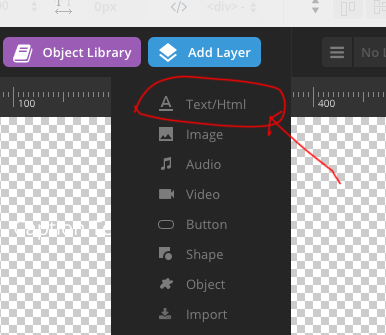
Please check the screenshot for the help!
Add one text layer for the link.
Then add the HTML code like this in the text layer.
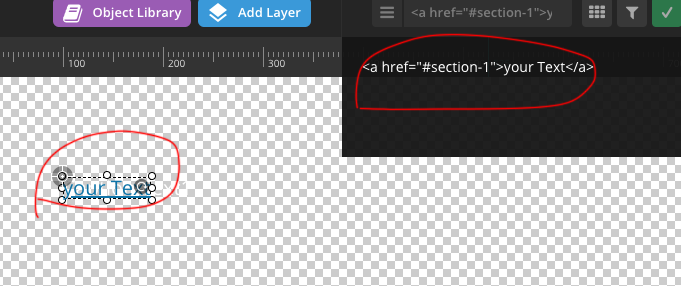
Hope this helps!
Not working…
I mean how can I dot that when the added layer is not a Text but an Object like a down arrow ???
Thanks in advance !
Hi there,
If you are using an Object Layer or any kind of layer, you can link it by clicking on the layer then click on the Actions option then the + icon to add a link to the layer.
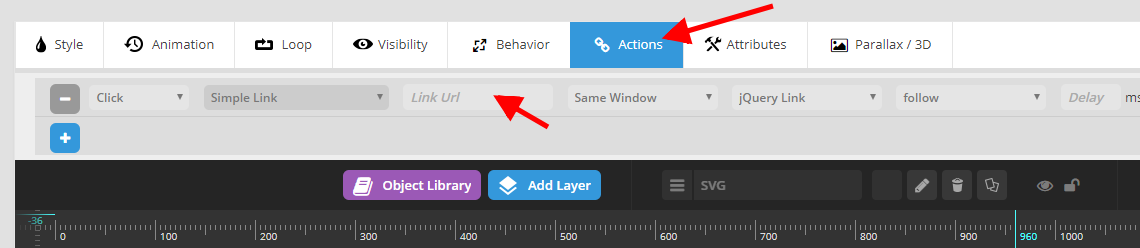
Hope this helps.
Working fine
Thanks !
You are most welcome.
This topic was automatically closed 10 days after the last reply. New replies are no longer allowed.