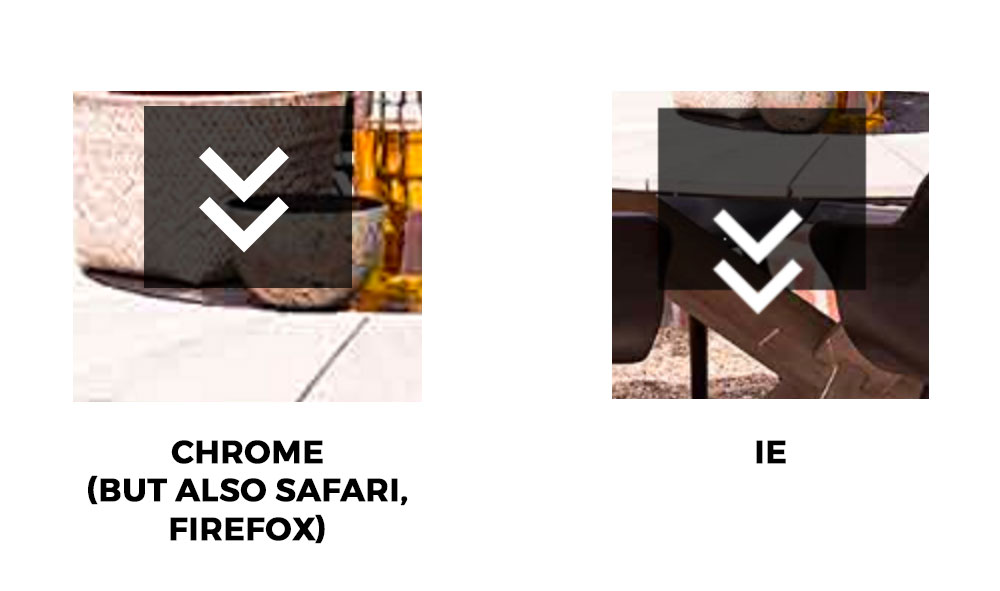
Slider Revolution - alignment problem in IE

I have the above issue with a Revolution Slider. One layer is simply a grey box (layer type Shape), and on another layer is an SVG icon from the object library within Rev. Slider.

The two layers align perfectly in every browser except IE. I know IE is notorious for bugs, but is this something that can be fixed? A workaround? Something I’ve done wrong? If all else fails, I’ll make my own png-file with the two objects merged.

Hi There,

Thanks for writing in! To assist you with this issue, we’ll first need you to provide us with your URL. This is to ensure that we can provide you with a tailored answer to your situation. Once you have provided us with your URL, we will be happy to assist you with everything.

Thank you.

secure note added. let me know if you also need backend login details.

Hi There,

Try adding this IE CSS fix:

@media all and (-ms-high-contrast: none), (-ms-high-contrast: active) {

 #rev_slider_2_1 > ul > li :nth-child(3).tp-parallax-wrap {
    top: 433px !important;
}
#rev_slider_2_1 > ul > li :nth-child(4).tp-parallax-wrap {
    top: 455px !important;
}

}


See this: http://www.mediacurrent.com/blog/write-conditional-css-ie10-and-11

Thanks for pointing the way. Some tweaking of the top-values was needed, but all is well now :slight_smile:

Glad to hear that.

Cheers!