Slider Rev: Animating out for a slide

Hi there,
I have learnt how to do animation for each layer - for both entry & exit of the layer.
But for a slide, is animation only possible for entry? I don’t see the options for animating out.

What I like to achieve is when a button a clicked, and before the next slide comes in, the existing slide exits & animates out gracefully. If this is possible, could you teach me?
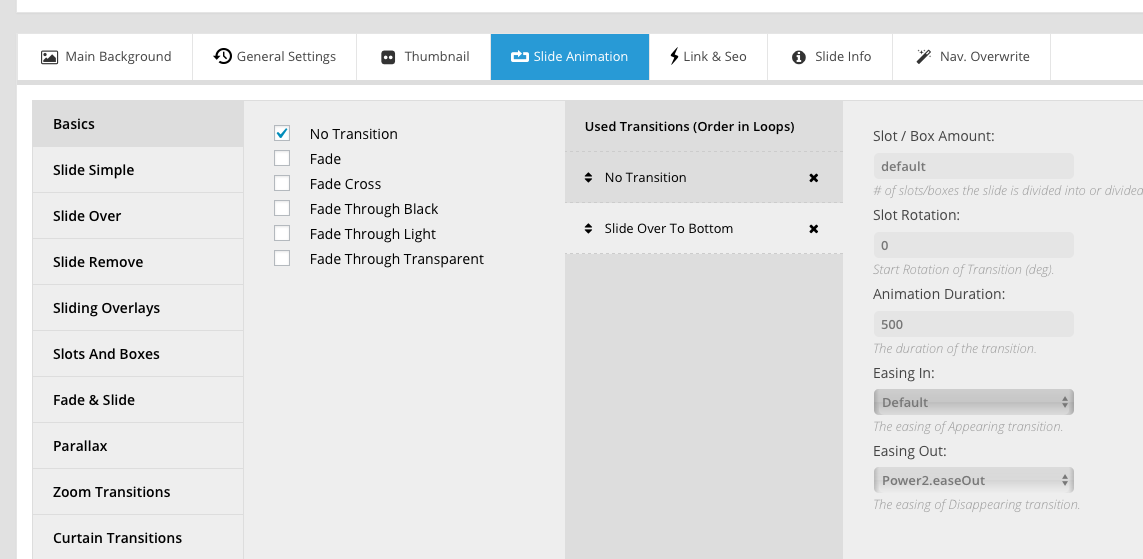

Hi,

You can set that under Slider Animation > Easing Out

Please refer to the link below for your guide.

https://www.themepunch.com/revslider-doc/slide-animation/

Hope that helps.

Hi Paul, thanks for reply.
But it didn’t work for me. I was hoping my slide with layers & contents would animate out before the next slide animates in.

As I don’t have a background image, but only a black color, I did not select an “easing in” - so I selected “no transition”. Then I select the “easing out”. But in the right column, you will still see “easing in” with “default”.

Also strangely, in the time bar at the bottom of the editor, the duration for the easing out (500 ms) is placed right at the beginning of the bar:

I could not see any exit of the slide. I then removed the “no transition”. Still there was no animation or easing out of the slide. Did I miss a step?

Hi @iamwithU,

It’s based on timing, your layer animation shouldn’t exceed the overall sliding time of a slide. Would you mind providing your
site’s URL and login credentials in a secure note?

I like to see your timing setting, then I may able to provide some sample.

Thanks!

This topic was automatically closed 10 days after the last reply. New replies are no longer allowed.