This slider is now cropping off the top and bottom of this slider and possibly a couple others. I cannot figure out what made this happen.

Thank you
This slider is now cropping off the top and bottom of this slider and possibly a couple others. I cannot figure out what made this happen.
Thank you
Hi @MichelleCReins,
Thanks for reaching out.
To better help you with your concern, please give us the following information in a Secure Note.
You can find the Secure Note button at the bottom of your posts.
Thank you.
Thank you.
Hello Michelle,
Thanks for providing the information. I have checked your site and it is because of your navbar settings. Kindly go to X > Theme Options > Header > Navbar and set the Navbar Top Height to 90 pixels. And then go to X > Theme Options > Header > Links - Alignment and set the Navbar Top Link Spacing to 10 pixels as well.
We would love to know if this has worked for you. Thank you.
Hey! That did work for the top part. What do I do for the bottom? It’s still being cut off?
Hey Michelle,
I can see that you have enabled the Parallax and 3D Settings in your slider:
After careful investigation, I found out that the section is covering the slider because you have added a negative margin of -2.5em. Please have it set to 0 instead.
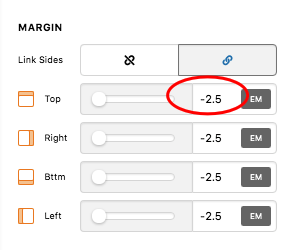
And make sure that your slider background is position to the center of the slide.
And also make sure that it is covering the Layer Area.
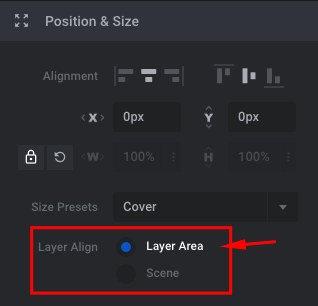
We would love to know if this has worked for you. Thank you.
This topic was automatically closed 10 days after the last reply. New replies are no longer allowed.


