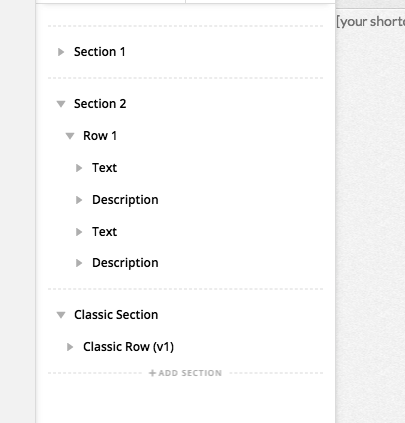
Skeleton view, labeling of,as seen from Layout pane

HI
I just updated X and the skeleton now conveniently shows on the left pane (thanks!).

Now… I want to clarify;

The rows and the columns are listed as “Classic”, but then have a (v2) designation.
Q: Is there any other kind of row or column? (i.e. is there a v3 version??, if so I would like to convert the whole website to use it).

Here is what I mean

THANKS

Hello @flashfog,

Thanks for writing in!

There is no V3 in the layout pane. Only the classic rows and columns will have a designation of v1 if you are using X and Cornerstone. The v2 notification will appear if you are using Pro editor.

There is no conversion method for the whole site. You will need to recreate the page from scratch if you want to use the latest Row element.

Hope this helps.

I am just confused because I thought on a previous update, a new default column and row type had been introduced, and from that point forward previous types (i.e. the first one) were to be referred to as Classic. So… what you are saying is that this jump was never really made (at least for CS), and that the only way to access V2 is by using the PRO editor?

Hi @flashfog,

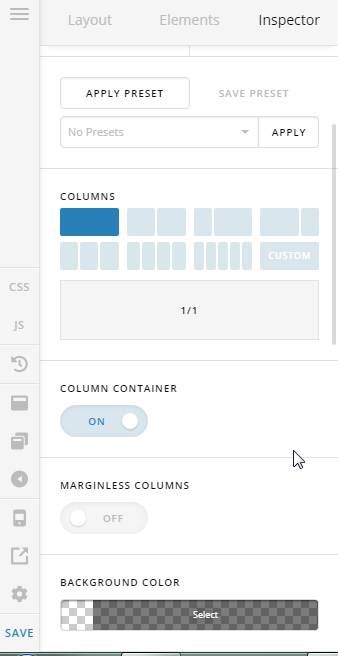
I understand your confusion, lets put it this way, the Classic Row (v1) is the very first version of ROW, the one with few options on it.


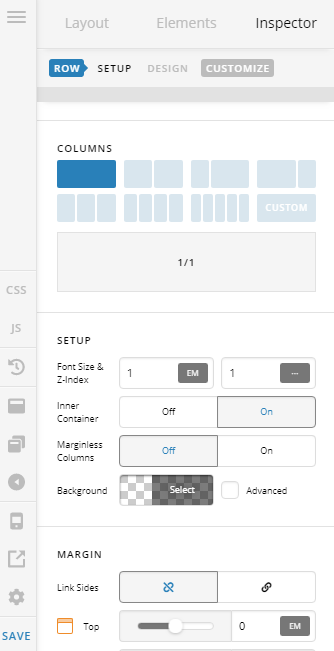
The Classic Row (v2) is the one that you’re used to (with more options).

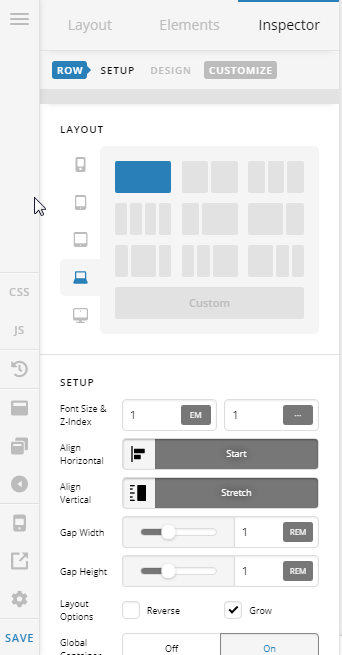
The new and improved version of Row (and Column) has this new shiny Layout and Flexbox setup options.

We do not refer to it as v3, (more like Row v2.1 if that helps clear things out).

You can learn more about that new and improved features in our Youtube Channel, and please subscribe for the upcoming videos.

Cheers!

This topic was automatically closed 10 days after the last reply. New replies are no longer allowed.